April 28, 2005
TOC Part 3 - Theory of Contingency
One thing that TOC DOES get right is the need for contingencies. Contingencies have been a part of project planning for a long time. If I read Latin I'm sure that we could find some description of them in the graffiti on the walls of Pompeii or scratched on the stones of the pyramids. At the most basic they are simply a little bit of extra time allocated for all of the unplanned or unpredictable events that may affect the project.
Proponents of TOC claim that their approach is unique because it aggregates all the contingency from each level of the project (claiming that each individual adds some and their manager adds some and then the manager of the manager adds some more) and places it in a single "buffer" at the end of the project. Somewhere that it can be watched over easily and since it is on a high shelf, individuals won't be taking some "just in case". I'm still not sure how this is any different from the usual.
One area in which TOC has a shortcoming with contingency is in how it is calculated. The implementations of TOC that I'm familiar with take the critical path and put a buffer at the end of it (based on the underlying variability of the tasks within that path). So far so good. Then they examine the schedule paths which feed into the critical path and place a buffer on them.
The problem with this is that the tasks on these feeding chains are double buffered, sometimes to the extent that the resulting schedule no longer makes logical sense.
Let me explain by example. Consider a schedule with 8 activities. The critical chain is A,B,C,D,End
There are three activities X,Y,Z which are parallel to A,B,C but are just a day shorter in total duration. The TOC software puts a buffer after End equal to some percentage of the task variation of the sum of A,B,C,D,End. Then it inserts a buffer between X,Y,Z and D. The result is that X is now scheduled to begin before A. This makes no sense to people on the project and they begin to doubt the validity of this approach.
Instead of inserting buffers by rule (a rule we have just shown to be odd if not invalid) I think it is better to put contingency where it belongs and to derive the PROBABLE critical path using techniques like Monte Carlo simulation. This way you are dealing with a better set of probabilities (it requires no more inputs than TOC) and in the case of multiple near critical paths it can point out which paths require close attention and which are closer to being a "sure thing". For more on Monte Carlo schedule simulation you can check out a macro I wrote which does monte carlo simulation in Microsoft Project.
Posted by Jack at 12:07 PM | Comments (0) | TrackBack
April 27, 2005
News to Me
MPUG (Microsoft Project Users Group) changed their identity last month to MPA - The Official Industry Association of Microsoft Office Project. I'm not sure exactly why they changed the name, but MPA does roll off the tongue better. They say:
"The MPUG team is delighted to announce that we have been working hard over the past several months to enhance membership benefits and position the MPUG brand to better reflect our identity as a professional association."
The new/enhanced membership benefits are things like a searchable library, job board, forums, events and even (hmmm...) branded merchandise.
Regardless of the latter item, it IS a good place to visit and if you are not too proud to join any club that would accept you, you might want to consider membership.
Posted by Jack at 03:54 PM | Comments (0) | TrackBack
April 23, 2005
PMP, did they spell that right?
The google ads on my site are all showing PMP certification courses and cheatsheets tonight. How embarassing. One of these days I'll get around to putting some details behind my objection to PMI's shameless fund-raising and consultant full-employment actions, but for now let me just say I don't get it. Why pay for something so meaningless? Am I alone in thinking that everyone with a PMP has been conned? Do they really think it means ANYTHING?
For anyone reading with a PMP certification. Sorry if I have insulted you personally. Feel free to leave a comment telling me why I am wrong. I'm flexible. If you can make a good case I might even change my mind
Posted by Jack at 11:19 PM | Comments (4) | TrackBack
The Rock
T.S. Eliot wrote in Choruses from the Rock
Where is the Life we have lost in living?

Where is the wisdom we have lost in knowledge?

Where is the knowledge we have lost in information?
For project management it is clear that information about things is not enough, we must know (have knowledge about) what the information means, but Eliot points out that information (and here I am interpreting) can kill and bury whatever knowledge we have, and further that our wisdom can be lost in a sea of knowledge.
To me this is another stake in the heart of project management information systems which blindly gather data and spin it into project information, or more precisely, pile it up until it looks something like information. A web interface is a huge pipe for information, but knowledge and wisdom are not to be found at the other end of it. People at the wide end of the pipe don't have a box to fill in with knowledge, much less wisdom. Discussion is the key to understanding.
Why does judgement have such a bad name? Isn't that what managers are paid to supply?
Posted by Jack at 11:00 PM | Comments (0) | TrackBack
April 22, 2005
Schedule Games
Johanna Rothman posted something on "Schedule Games" which reminds me why I continue to think that big schedules and big systems are sometimes less of a help than they are made out to be. If people are playing with the schedule then sometimes it is best to take the ball away. Technical indicators of progress are often more reliable and useful.
Posted by Jack at 12:58 PM | Comments (0) | TrackBack
April 21, 2005
Call for Entries
I started a criticism bl_g here. Let me know if you have any suggestions for sites to review. Even your own.
Posted by Jack at 12:51 PM | Comments (0) | TrackBack
Working with Custom Field Formulas
The Fourth in a Series of Short Notes about Using Project VBA
Technically the formulas in customized fields are not VBA, but they are quite similar. With Project 2000 Microsoft added the capability to have a field display the results of a user-defined calculation. Until then, fields would only contain the value that the user put there. Needless to say, having the ability to have formulas was a big step forward. In fact, in some cases formulas are more useful than VBA macros are. The main reason is that they calculate automatically whereas a VBA macro needs to be executed either by calling the macro or tying it to some event (and events in Project are not what I'd consider robust). Because of this the field can display real-time information about a task.
Formulas in fields can with a little work control the formatting of your schedule as well. With a formula setting the value of a flag field, and a bar style which applies to tasks with that flag field set to "Yes" you can change what the gantt chart displays. There are also indicators which can be shown in the specific cells if the formula returns a particular value.
Of course there are some limitations to these formulas. They can only work with information from the particular task they are associated with and a handful of Project-level fields (Things like Project Start). In cases where you need information from other tasks a formula is not going to be sufficient. I've put together some guidelines about choosing one over the other. You can find them here.
Working with Formulas is pretty simple, but they are hidden rather deep in the interface. To get to them, right-click on a column header, choose customize fields, then choose the field you want the formula to apply to and click on the "formula" button. This brings up a dialog box where you can enter and edit the formula. Note that the = sign which is required for formulas in Excel is NOT REQUIRED and if you enter one you will get an error. After you have written the formula choose OK and you get back to the customize fields screen. At this point you have one more decision to make, you can decide whether the Summary tasks use the formula or not. The default is to not use the formula so be careful here if you want them to use the same calculation.
The variety of formulas is huge but here are some common situations people encounter in using formulas:
My formula refers to Baseline or Deadline fields.
When there is "NA" in the baseline or deadline it gives an error:
This problem is caused by the fact that the project gives a numerical value of 4294967296 (2 to the 32nd power - 1) if the field is "NA" (blank). Why it does this rather than giving a value of 0 I do not know, however once you know that it uses this number you can write a formula which accounts for it.
The solution is to use an iif statement. The syntax for an iif statement is as follows:
iif(expression, value if true, value if false)
So if you want to know if the difference between the baseline finish and the finish of a task you would use a formula like this (in a text field):
Iif([Baseline Finish] > 50000, "There is no baseline for this task", [Baseline Finish]-[Finish])
Another alternative is to use ProjDateValue to evaluate the data stored in the baseline. Since an empty baseline shows "NA" for dates such as Baseline Finish, you can test for it directly.
iif([Baseline Finish]=projdatevalue("NA"), "Has Baseline", "No, Baseline")
I am getting unexpected values when using work or duration in my formula.
The problem is usually caused by failing to convert the units correctly.
When you use duration or work in a formula Project uses the value of either in MINUTES. This can be confusing if you are subtracting a duration of 1 day from a duration of 2 days. You would expect that 2 - 1 = 1, but in Project it equals 480 minutes.
Now you may wonder why 480 minutes? There are 24 hours in a day x 60 minutes, however by default a Project day is 8 hours or 480 minutes. One easy way to handle this is to simply divide by 480 as in this example.
([Baseline Duration]-[Duration])/480 & " days"
You will then get the difference in days (note that using the & will concatenate the text within quotations to the result of the first part of the equation).
However there are times that a different project calendar is used and in that case a day may be defined as 24 hours or 7 hours. Because of this it is safer practice to use the constant [Minutes Per Day] or [Minutes Per Week] in the formula.
([Baseline Duration]-[Duration])/[Minutes Per Day] & " days"
I want to subtract one date from another in Project.
There are a number of ways to do date subtraction. The first is to simply subtract one from the other like this:
[Finish]-[Start]
On a one day task which starts and ends the same day this will return a value of .38 which is somewhat useful, but as in the section above it takes some conversion to make
sense of it. .38 days = 8 hours.
This approach also has some problems if you are subtracting across a non-working time such as a weekend or holiday. Or if the task ends on the next day. Then the value will be quite unexpected.
So there is another method that Project provides to do date math. It is to use the ProjDateDiff function. The syntax is as follows:
ProjDateDiff( date1, date2, calendar )
Using this will give you the difference between two dates according to a specific Project calendar. If you leave the calendar blank then it uses the Standard calendar. Otherwise you can specify the calendar (put the name of the calendar in quotations).
Here is an example of a calculation which finds the difference between the start and the finish of a task:
ProjDateDiff([Start],[Finish])
Note that the field order is different than the original equation. For a positive result you put the soonest date as the first parameter and the latest date as the second.
Posted by Jack at 12:22 PM | Comments (1) | TrackBack
April 20, 2005
Who butters your bread?
There are many different project management styles and theories floating about with strong proponents of each type or flavor. I've pretty much come to the conclusion that there can be no reconciliation about which is best as they all are "best" for something. Let's take the example of the typical cost-loaded schedule used in Earned Value Analysis.
Where did this method first evolve? Well, it evolved in an environment which had a strong tradition of issuing contracts. The natural language in such an environment was $ and work packages. It is no wonder that it spread (even if slightly modified) from there to large public works projects where once again $ paid for work done is the name of the game. Specs in this environment have to be quite strict and well developed because you get what you pay for. If you want more or want to do something different then Ron Tutor ends up with a new airplane. The project schedule and inspection reports are almost certainly going to end up in court as "Exhibit A" being presented by one lawyer or another. Is it any wonder that people in that industry would be suspicious of any scheduling or management practice which did not account for and document everything? Of course. They are motivated by money.
However, what makes/saves money for one industry does not always work the same for another. A schedule as a legal document is superfluous and wasteful when you have an internal team which is working on a project. Typically you want them to complete their work as efficiently as possible. This means looking forward and only looking back to see what went wrong so you won't do it again. Fixing the issue of the day is more important than counting the hours spent idle due to it. The balance of priorities is different and so the management response is (should be) necessarily different.
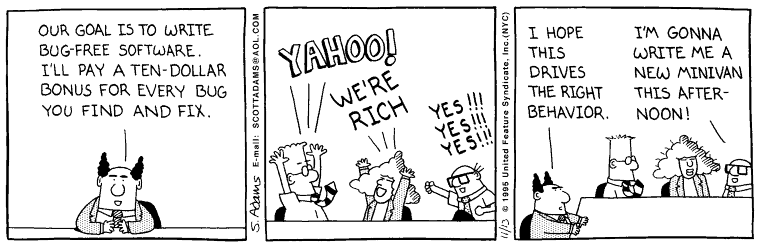
So the question remains, which is best for you? Well, to look at it cynically, the answer is whatever will make you the most money. Balance the cost of the system against the results. I'm still trying segue to one of my favorite Dilbert cartoons but am having trouble doing it gracefully, so here it is.
Posted by Jack at 12:54 PM | Comments (0) | TrackBack
April 19, 2005
Where Things Break
I'm tempted to say "where they are connected" and leave it at that, but that would go against my basic principles. So here is the full story.
A few days ago I came home and found that the washing machine was no longer washing. In fact it wasn't doing much of anything except making a whirrring sound when I twisted the knob. This was a problem because it was filled with soap, clothes and water. So I pulled the clothes out and wrung them dry and bailed out all the water and set to work trying to find out what was wrong. I suspected that I would need a new belt, but it turned out I needed one of these because the little plastic fingers had broken off the old one. While I was doing this my wife was asking "shouldn't we just buy a new washing machine?".
It was actually easier to replace than I thought it would be, but I was not finished yet. I put the rest of the clothes in and ran the wash. It worked, at least until the next day. Then it turned out that water was flooding the laundry room. I seems that in working on it I must have loosened the water level sensor hose and it came off. So I opened it up again and sure enough it was no longer connected. The thing is fixed now - I hope.
So what does this mean? It means that in general things break where they connect to other things and by an extreme generality, projects and designs always are going to have trouble at interfaces, places where your team is dependent on another group to deliver something, places where your module hooks up to another, places where the roof meets the skylight flashing. Certainly stuff breaks in between, but that is usually a slow and predictable failure. The breaks at interfaces are often harder to detect until they occur and then they can occur suddenly.
There is not much you can do about this except design them better, like the part for my washing machine was redesigned. They made the fingers bigger so the thing locked together better. You can do this within your team, by making sure that interfaces and handoffs are well defined and understood - and that people on both sides communicate well. You can do this by carefully limiting the number of interfaces so that cross-site or cross-geography interfaces (where communication is difficult)are minimized. You can do this by standardizing and documenting the interfaces so there is less chance for error.
But to summarize, things break where they are connected.
Posted by Jack at 10:47 PM | Comments (1) | TrackBack
Note to anyone who is wondering about this color scheme
This site would be in blue and yellow if only yellow text was readable.
Posted by Jack at 01:00 PM | Comments (0) | TrackBack
I was right - it is incestuous.
I didn't really read any bl_gs until I started this one. Now I find that most people who read this have their own bl_gs. And if those people link to your bl_g in someway or another then you get more readers. So to get more readers, the best way is to say things which get noticed by others. I find that most people tend to like to read and recommend things that they agree with. I know I do. It seems to me this tends to amplify the positive and familiar. This is sort of OK, but a system with too much positive feedback becomes a problem. How?
Everyone who has attended a school assembly will recognize the effects of a positive feedback loop. Yes, that loud screeching from the public address system which leads you to cover your ears with your hands and yell "turn it down!".
Posted by Jack at 12:46 PM | Comments (0) | TrackBack
April 18, 2005
Reliability vs. Validity
I just read an article by Roger Martin which resonates with some of my feelings about "Project Management Systems" and the like. He posits the two as opposite ends of a spectrum. The key point is that driving toward reliability (repeatability) requires reducing the number of variables and standardizing measurements. In doing so, your results are less valid - that is they are less likely to reflect reality.
I do a poor job of describing it here so go read it yourself and see which direction you are heading. Personally it helps me justify my bias against big project management tools.
Posted by Jack at 12:25 PM | Comments (4) | TrackBack
Working with Other Applications
The Third in a Series of Short Notes About Using Project VBA
Project is designed primarily for calculating schedules using the Critical Path Method (CPM). However, there are often times you need to do more advanced calculations than are available natively in Project. The easiest solution is to turn to another application to do the calculations or to work with the resulting data.
An example of this is the use of Excel. It is actually quite simple to do this. The first thing to do is to set a reference to Excel. You do this by:
Opening Project.
Hit ALT+F11 to open the Visual Basic Editor.
From the Tools menu select "References".
Scroll down until you see the Microsoft Excel Object Library (or something similar).
Make sure the box next to it is checked.
Once that is complete you simply create a new instance of Excel and add a worksheet if necessary.
If xlApp Is Nothing Then

'Start new instance

   Set xlApp = CreateObject("Excel.Application")

      If xlApp Is Nothing Then

         MsgBox "Can't Find Excel, please try again.", vbCritical

            End         'Stop, can't proceed without Excel

      End If


      Else

        Set xlR = Nothing

        Set xlApp = Nothing

        Set xlBook = Nothing

        Set xlApp = CreateObject("Excel.Application")

        If xlApp Is Nothing Then

            MsgBox "Can't Find Excel, please try again.", vbCritical

            End         'Stop, can't proceed without Excel

        End If


    End If

xlapp.Visible = False

Set xlBook = xlapp.Workbooks.Add

Set xlSheet = xlBook.Worksheets.Add

xlSheet.Name = ActiveProject.Name
I use CreateObject here rather than GetObject based on Microsoft's recommendation in this article. If you use GetObject you may get this error:
Run-time error '429':

ActiveX component can't create object
Once that is done you can use any of the Excel VBA you need to manipulate data, format it or anything else. The following code is from a Monte Carlo simulation macro I wrote. You can find the complete thing here. What this code does is set the value of xlRow (actually a specific cell in Excel) to the value of the task finish. Then it shifts to the next cell down using the offset function.
For Each t In exportedTasks

xlRow = t.Finish

Set xlRow = xlRow.Offset(0, 1)

Next t
Once you have Excel running you can do just about anything you want with it. With a bit more code, the macro this was taken from could summarize the data and graph it. By using the two tools together you can do many things which would be difficult to do alone. I have a few other simple examples here. Be forewarned that they do not use the GetObject method. Sooner or later I'll revise them to reflect what I now know more about.
Posted by Jack at 12:07 PM | Comments (0) | TrackBack
Are you living in a Superfund site?
A bit slow, but an interesting on-line mapping application by the EPA.
Posted by Jack at 07:56 AM | Comments (0) | TrackBack
April 17, 2005
TOC Part 2 - Theory of Consulting
It seems that one thing that is required when implementing TOC is consultants. Now, since you can read Goldratt's books and you can see how Alex Rogo thinks this stuff up all by himself, implements it and saves his company, you might start thinking it is possible to do it yourself. But according to the consultants you would be wrong.
One can't fault consultants. They have bills to pay just like everyone else. I know that many of them provide important services (Just try implementing Project Server on your own...), but I tend to be suspicious of them when they say start listing everything that you will need to do and it all requires their participation. I'm still not sure why something supposedly as simple as TOC requires a huge effort. I've already mentioned that it is very little different from a resource loaded critical path schedule. Any competent Project manager should be able to understand it.
Another thing that TOC people will constantly repeat is that you need executive sponsorship or your implementation will fail. Um... generally if you are going to change the way you manage your company - even if you are going to use the I Ching - you will need upper management to be involved in some way. And of course there are courses available for upper management. What I find a bit objectionable about this is that it is like saying that for the diet consultant to guarantee the results you must already weigh less than xx pounds. Management buy-in is half the battle. One almost thinks that the reason that the consultants want upper management involved is that the consultants know who have 6 figure spending limits.
But, please don't get me wrong. Most of the TOC consultants I've met have been personable and seemed to genuinely want to help. I'm not against them, I just find that some of their practices seem to have a strong element of self-preservation surrounding them and I wonder how much that drives the canonization of TOC rather than the other way around.
The next article will get into some of the mechanics of TOC and examine the typical claims made for TOC. With some real examples we can move away from my opinionated comments and towards something worthy of reasoned discussion.
Posted by Jack at 09:17 PM | Comments (0) | TrackBack
April 15, 2005
TOC Part 1 - Theory of Constraints
When I first heard about the Theory of Constraints in 1997 I was curious about it. I read "THE GOAL" and thought, well it seems reasonable, but hardly surprising. Then I read "CRITICAL CHAIN" and then started thinking is that all there is?
To be honest about it, from a project scheduling point of view there is not much more to it than a resource loaded critical path method (CPM) schedule with a certain amount of strategically placed contingency tasks. I was underwhelmed. To top it off, the concepts are wrapped in a second-rate novel. Um... OK. I just didn't see why anyone would care particularly much about a repackaging of existing concepts. Then I learned that Mr. Goldratt had his own institute. An institute with $10,000 Jonah programs. It got me thinking of L. Ron Hubbard.
But misgivings aside, it was clear that I was headed for a collision course with TOC. I'll cover that in some upcoming postings.
Posted by Jack at 10:39 PM | Comments (3) | TrackBack
April 14, 2005
Future
Happy team
Trust
How do I get a job doing nothing
Posted by Jack at 05:35 PM | Comments (0) | TrackBack
Project mythologies and fuzzy thinking.
OK, one more rant before I stop for the day. mythologies and superstition seem to be rampant in the project management world both in terms of consumption and creation. And a lot of the PM blogs use big or marketing type words - primarily the ones with books to sell. I'm gonna have to think up something catchy to match up with things like "lean", "agile", "TOC" and the like. Either that or learn enough about them to write a boatload of nasty comments. I think I'll tackle TOC first...
Posted by Jack at 05:22 PM | Comments (4) | TrackBack
Project Management Aphorisms
What is it about "Project Management People" that causes them to express themselves in aphorisms? For an example check out this blog. Is there not enough truth that they feel compelled to make up some more? Is it that an aphorism reads well on a powerpoint slide? How can "Project Management" have more aphorisms than a more concrete science like physics?
I'm going to go out on a limb here and postulate: "The more aphorisms, the less knowledge"
Posted by Jack at 12:44 PM | Comments (0) | TrackBack
If you can stand to read Ebooks...
then Project Gutenberg has something for you. I'm starting to wonder how anyone can ever keep up with all that is available. Maybe just starting with the "Top 100" would be enough.
Posted by Jack at 12:10 PM | Comments (0) | TrackBack
What you get for your money.
I spend what seems like a lot of time working with schedules and scheduling tools. But in practice the visible product of that work offers a pretty poor return on the effort that went into it.
To illustrate what I mean let me give the example of a large project I'm familiar with. This project involved roughly 2000 people working full-time for several years. Project schedules were developed and tracked at a high level of detail with tens of thousands of activities and a requirement that every person posted the details of their daily work. The end result was a schedule model and some indicators that showed the project was going to be late.
If you take a look at the effort that went into creating and maintaining that schedule and the resulting indicators you would find it was a couple dozen person-years. Now perhaps on a large project that is not too large a price to pay, but in absolute terms it seems immense.
However, on this same project, in some back cubicle someone put together an informal pool and kept a list of people's guesses about when the project would complete. None of these guesses were as optimistic as the results that the schedule produced. All of these guesses were closer (by several months) to what actually happened than the schedule projections were for most of the project. The cost of these guesses was a few person-minutes a piece. Based on this I did a similar exercise on another project. At the beginning I asked the people working on the project when it would finish. I got a range of several months on a project which was to last about a year and a half. It turned out that the average guess was within a week of what actually happened. Once again it took about an hour to actually do this.
My purpose in this is not to say that schedules are useless. They certainly are not. But it is clear to me that their value as a predictive tool is vastly inferior to the informed judgement of the project participants.
Now one can say, "well, if they put what they really think into the project schedule then it will be correct", and in a perfect sort of world I'd be forced to agree. But the world is not perfect and a schedule is a necessary abstraction of what is planned so there is some detail that is lost and some assumptions which can not be embodied. One can not create the Mona Lisa with a box full of dry erase markers. However, the human mind can imagine it with minimal effort. Why not use that same power to predict when your project is going to complete?
Posted by Jack at 08:16 AM | Comments (0) | TrackBack
Future Topics
Theory of Constraints
Project Templates
Why Project Server is ____(FIB)
(anyone have any suggested topics?)
Posted by Jack at 08:14 AM | Comments (7) | TrackBack
Andy Irvine - When the Boys are on Parade
While listening to KKUP on the way to work this song came up. It is hard to stop whistling the chorus.
Posted by Jack at 08:07 AM | Comments (3) | TrackBack
April 13, 2005
Working with the Project Object
The Second in a Series of Short Notes About Using Project VBA
Using a Project object of some kind is essential to programming Project. Like the Task object, it is also a member of a collection, in this case it is part of the Projects collection. Although the Projects collection is under the Application it is what Microsoft calls a "top-level object" meaning that you can use it without needing to specify the Application. This means both of the following are equivalent within Project (though if you are controlling project from another application you will want to specify the application just to be clear):
Application.Projects
Projects
The Project object I use most often is the ActiveProject. ActiveProject is simply the project you are currently working on in project. If you have multiple projects open then it is the one which is in front and which has the cursor active in it. Most of the time you want your code to operate on the ActiveProject and not some other project so code typically looks like this:
Set ts as ActiveProject.Tasks
There are cases where you DO want to work on all the projects that are open. In this case you would forgo using ActiveProject and refer to them individually. You can use For..Next to go through all of the open projects:
For Each Project In Application.Projects

'run subprocedure

Next Project
The Project object can refer to any project and you can define as many as you like. This can be useful when you want to compare a project which is open with another.
Dim proj1 as Project

Dim proj2 As Project

Set proj1 = ActiveProject

Set proj2 = FileOpen("c:\myfilename.mpp")

If proj2.Tasks(5).Finish = proj1.Tasks(5).Finish Then

     msgbox "Task 5 is unchanged."

End if

End Sub
You can use an index to refer to a specific project, though the index of the project is dependent on the order in which the files were opened, so there is room for some surprises here:
Set proj1 = Application.Projects(1)

Set proj2 = Application.Projects(2)
There is another interesting type of Project and that is the SubProject. Subprojects are any projects inserted in a "Master" project. Sometimes it is necessary to go through them as well. An example is setting a particular view or modifying some information which can not be done in the "Master" view.
Dim subproj As Subproject

Dim myproj As Project

'go through all the subprojects in the file

For Each subproj In ActiveProject.Subprojects

    'open them all in turn

    FileOpen (subproj.Path)

    Set myproj = ActiveProject

    'when open do something to the file

    FileClose

Next subproj
The Projects collection has a small number of properties including count, parent and item. It also has a method to add a project. Project and SubProject have too many properties to describe here, but eventually I'll get around to covering some of the more interesting ones.
Posted by Jack at 07:35 AM | Comments (0) | TrackBack
April 12, 2005
Working with the Tasks Collection
The First in a Series of Short Notes About Using Project VBA
The tasks collection is simply a collection of all the tasks in a project. It is the starting point for most Visual Basic programming exercises so it is important to know how to use it. The first thing is in how to set it. This is done using the Set keyword.
Typically one sets a collection to all the tasks in the project, but it is possible to set it to some other task collection.
Here is an example of setting it to the tasks in the active project:
Dim ts as Tasks

Set ts = ActiveProject.Tasks
Another useful trick is to filter the project first and then set the task collection to the set of filtered tasks:
SelectAll

Set ts = ActiveSelection.Tasks
Once we have the task collection we can go through it in a number of ways. If we want a specific task we can ask for it by index. For example if we want the first task the code would be:
Dim t as task

Set t = ts(1)
Quite often we want to do something to all tasks in the project. In that case we would set the task collection as above and then loop through it using a for..next structure:
For Each t in ts

     t.Text5 = "Foo"

Next t
This approach works until you hit a blank line in the project. In the case of the blank line the task is what Project refers to as "Nothing". You can do nothing with Nothing, so setting the Text5 value for Nothing will give you an error. Luckily you can check to see if a task is Nothing and therefore skip doing anything that would cause an error and stop your code. To do this we add a simple If statement:
For Each t in ts

     If not t is Nothing then

         t.Text5 = "Foo"

     End If

Next t
We can do a similar thing to ignore summary tasks. You might want to do this when altering a value like duration which is not something that you can edit directly for a summary task. I use something like this:
If not t.Summary Then

     'do stuff

End If
Putting it all together we have this generic structure to loop through all tasks in a project:
Dim ts as Tasks

Dim t as Task

Set ts = ActiveProject.Tasks

For Each t in ts

     If Not t is Nothing Then

          If Not t.Summary Then

              'do something

          End If

     End If

Next t
By putting your code in the middle of this structure (where it says "do something" you can be sure it will be applied to all the regular tasks in the project and won't generate an error when it hits a blank line.
Posted by Jack at 12:38 PM | Comments (2) | TrackBack
Hall of Mirrors
My first thoughts about blogging were that it is an exercise in narcissism and that only the mania for constant self-reflection and self-aggrandizement would be enough to keep a person publishing one. My reasons for thinking this were many. Take a look at some of the blogs which are out there. It is hard to count how many bloggers out there blog about blogging and by simple association blog about themselves in the process. The fact that such bloggers invent terms such as blogosphere and hold conferences and create incestuous links between themselves is reason enough to believe that this is a large component of the fascination with blogs.
But after thinking more and looking around I see some people are just as concerned with using a blog to post things which are interesting to them. Some post things which may be useful to others. In short, they just use a blog as a container for some information.
It strikes me that to them, the blog is like a book. The form of publication is not what is important to them, but the fact that there are readers (even if it is only the person publishing it in the first place) is important. This sets them apart from the blog bloggers I described earlier who upgrade the journalist's vice of writing about journalism and send that writing at the speed of light into the teeth of their fan clubs.
So how does this get resolved in the case of this blog? If I write about blog bloggers do I become one myself? Or is it possible to take the role of the critic? Does a critic become a bad poet just because they criticize bad poetry? I'm hoping not. Still it may happen. But until then I'll be content throwing rocks in the hall of mirrors.
Posted by Jack at 12:11 PM | Comments (0)
April 11, 2005
First Post
What more can be said? Socks go on before shoes...
Posted by Jack at 08:00 AM | Comments (0)