« June 2005 | Main | August 2005 »
July 29, 2005
Securing Your MS Project Files and Macro Code
Securing your project file or keeping things secret inside it seems to be a perpetual topic. There are some parts of the file that you can secure fairly easily, but if you encrypt or remove any of the data that is needed for project to calculate you will have problems. That said, here is some simple code for encrypting the date entered in the Text1 field:
Sub encodeTextField1()

Dim t As Task

Dim ts As Tasks

Dim tempString As String

Dim key As Long

Set ts = ActiveProject.Tasks

key = InputBox("Enter Key between 1 and 256")

For Each t In ts

    If Not t Is Nothing Then

        tempString = t.Text1

        eNcode tempString, key

        t.Text1 = tempString

    End If

Next t

MsgBox "Done"

End Sub
Private Sub eNcode(ByRef eText As String, ByRef eKey As Long)

    Dim bData() As Byte

    Dim lCount As Long

    bData = eText

    For lCount = LBound(bData) To UBound(bData)

        bData(lCount) = bData(lCount) Xor eKey

    Next lCount

    eText = bData

End Sub
What this macro does is prompt the user for a key which is used with the XOR operator to encrypt the data. You can read more about how this works here. If you like, you can expand on this and use a more sophisticated algorithm, but this should stop most casual readers from decrypting your data unless they have read this article.
The problem with this approach is that the algorithm used for encryption is exposed whenever anyone hits ALT+F11 and views the macro code. You can avoid this by keeping the code in your global.mpt file. However, that would prevent any others from being able to encrypt the data. So we need to take a second step and protect the macro code itself.
- From the VBA editor, right-click on the module where the code is located.
- From the shortcut menu, select VBAProject Properties (If it is in your global.mpt file it will be ProjectGlobal Properties)
- On the Protection tab, check the Lock Project For Viewing check box.
- Enter a password and verify it in the boxes at the bottom of the tab.
- Click OK.
Now your code is protected. I should warn you that even this is not secure. It is possible to break the password that you have used to protect the macro and with knowledge of the algorithm you used it may be possible for someone to break the password which you have used to encrypt the data, so if something is really secret don't even bother to do this, just keep the file locked somewhere secure and don't share it. But for casual users this should be sufficient to keep them from snooping around.
Posted by Jack at 12:16 PM | Comments (0) | TrackBack
Finally the truth! and just as quickly gone...
For those who always wondered how a computer works here is a sight that explains in plane english. Don't forget to tip the webmaster. Now about those busses Judy, it seems somehow you have gotten on a short one.
-------Update--------
Sorry, but that link is dead now. Apparently someone out there thought it was dangerous:
Name: Address: XXXXXXXX Subject: Tripod Type of Abuse: Fraud Service: Report AbuseI found that website that is giving 99% of wrong
informations about computers.http://judy-patch.tripod.com/
The person is even proposing to receive Paypal
donations for her information given.For those reasons and because this site is
intentionaly sending false information, I am
asking you to have it shutdown ASAP.Regards,
XXXXXX
From : support_abuse_ls@support.lycos.com
To : XXXXXX
Sent : XX july 2005 XX:XX
Object : Re: Tripod: Fraud (KMM25269096V4XXXXXXXX)
Hello,Thank you for contacting the Lycos Network Abuse Department.
The account you have brought to the attention of the Lycos Network Abuse
Department was found to be in violation of our Terms and Conditions. As
a result, it has been removed from our servers. Thank you for reporting
it to us.Please note that the creator of this page is in no way directly
associated with the Lycos Network or its web publishing products. We
exercise no editorial control over the content posted by or the actions
of our users. All users are expected to abide by our Terms and
Conditions, which can be found at the following URL:http://www.lycos.com/lycosinc/legal.html
I hope you find that our prompt response to this situation addresses
your concerns. If you have any questions or find more accounts that
require our attention please feel free to contact us again.Sincerely,
Xxxx
Lycos Network Abuse Specialist
http://reportabuse.lycos.com
Remind me to think twice before I engage in satire.
Posted by Jack at 09:33 AM | Comments (1) | TrackBack
July 28, 2005
I'm uh... honored.
My blog got some mail today:
As a producer for the "Forbes Radio" channel on American Airlines, I am
personally extending an invitation for Zo-D to appear on an upcoming
in-flight radio broadcast airing worldwide January 2006. This is a sponsored
program, which reaches over 4.2 million potential listeners.This unique radio program will be spotlighting the most innovative
organizations and their forward thinking leaders who present strategies and
solutions to help global businesses increase market share, improve
efficiencies and maximize relationships with their customers, employees and
extended enterprise partners.Some of our distinguished guests who contribute their unique and insightful
perspectives on these special business airlines shows include.William Brock - former U.S. Senator and U.S. Secretary of Labor
Former Ambassador - Clayton Yeutter
Marshall V. Miller - Miller & Company
Craig M. Pool - Foreign Trade Zone Corporation
Donna Sharp - World Trade Institute of Pace University
And some of America's finest corporations:
Intel, The Broad Foundation, WellPoint Health Networks, Microsoft, Red Hat,
BP America, Cendant, Abbott Labs, BMC Software, Cap Gemini Ernst & Young,
Hilton Hotels Corp, American Medical Association, Deloitte and Touche USA,
FedEx Corp, General Motors, Kmart, Sun Microsystems, Sallie Mae, Starwood
Hotels, Storage Tek, USA Today and many others.Your spokesperson is invited to join our program and communicate Zo-D's
expertise, and vision to our captive audience of 4.2 million executive
travelers per month. Our listeners include business leaders,
vice-presidents, institutional and individual high-net investors who fly
regularly on American Airlines.Our production team of creative writers and engineers will produce an
informative and dynamic three-minute interview capturing the exact message
you want to convey. Your interview will then broadcast worldwide on 29,000
flights for the entire month of January 2006.Here is a review of what the package includes:
1. Production of a 3-minute interview to air on 29,000 audio-equipped
American Airlines flights
2. Listing in American's AAttractions In-flight Entertainment Guide. Total
circulation of 342,000
3. Rebroadcast of interview on www.SkyRadioNet.com with hotlink to your Web
site
4. Digital audio file of interview for integrated promotional purposes
5. "As heard on American Airlines" logo for airing of interview on your Web
site
6. All turnkey production including scripting of questions, recording,
editing, mastering and deliveryTo hear what's currently airing on Forbes Radio:
http://www.skyradionet.com/player.cfm?ID=2964You have time to prepare/schedule for the interview, as our recording
deadline is October 5th, 2005. However, time is of the essence to take
advantage.. Our space is extremely limited and we need a commitment by
Tuesday, August 2nd, to submit our invitation list to the airlines for print
purposes.We are offering a 50% discount.Instead of the normal rate card of
$9,995, your discounted rate is only $4,995.
If each of my valued readers chip in a couple hundred dollars each I can take advantage of this wonderful opportunity!
Posted by Jack at 06:46 PM | Comments (1) | TrackBack
July 27, 2005
PMBOK and Job Performance
"There is no statistically significant relationship between project management knowledge as demonstrated by total scores on the knowledge test based on the PMBOK Guide and the measure of perceived effectivemess of workplace performance", at least that is what Lynn Crawford claims are the results of a study published in the International Journal of Project Management (Vol 23, Issue 1, Jan 2005).
The conclusion is that "there is no direct relationship between how well project managers perform against standards for knowledge and use of practices, and how well they are perceived to perform by their supervisors".
It is a bit disappointing that the study relies on supervisor assessment and uses the measure of "perceived effectiveness" rather than some more objective measure. But it is an interesting study and points out some roadblocks which Project Managers need to overcome. When professional associations say one thing is important and the people who pay your salary say another, it is a difficult situation.
Posted by Jack at 05:38 PM | Comments (0) | TrackBack
Passing the PMP Exam
Preparing for the test is more than half the battle. One prospective test taker (IP address: 202.88.159.172) apparently found my site by way of searching for "How to copy rita mulcahy cd"... The things you learn from your referrer log! Sorry, I don't have an answer for that, but I'd suggest reading the PMBOK a few more times.
Posted by Jack at 05:21 PM | Comments (0) | TrackBack
July 26, 2005
Quick Trick Block Stack
I'd been telling my boys for a long time that I'd make some different blocks for them. I ended up making planks instead. Like lumber they are pretty easy to stack and arrange. The basic module is pretty simple. The pine board I made them from was 3/4" (~19mm) thick. I ripped it down into strips so that 3 of the strips stacked together would be as thick as the board. Then I cut that into a few different lengths. Most are 15/4 of an inch long, some are 18/4, others are 30, 45 and 75 quarters.
I used plain white pine. It is cheap and light. If you are going to do this yourself make sure you search through the boards and find one with vertical grain - the growth rings perpendicular to the width of the board - for the best results. I got about 300 pieces from a 3/4" x 12" x 6' board. Spruce would be a good alternative to pine.
The results are reminiscent of Kiyomizudera:


Posted by Jack at 11:27 PM | Comments (0) | TrackBack
Maybe I forgot the question marks...
Glen offers to set me up on a blind date with a real project manager I think because of this quotation I posted. Thanks Glen, but that was not my slam, it was a slam by the perl script kiddie. It might not seem like it from this blog, but I'm actually a bit familiar with what is needed to manage multi-zillion dollar projects. It seems to me that when solid things are involved such as airports, hospitals, bridges and rockets are concerned people are much more serious about planning. Some of this is due to having tangible measurable progress and where it is almost immediately obvious when it is not being done or is being done wrong. The other major factor is that to do this work contracts need to be written and thus scope is by necessity defined and measurement and payment are specified.
When the results are less tangible (perhaps in something like internal software development) and there is no real payment or non-payment for performance or the lack of, then you end up with these sorts of dysfunctional situtations. Indeed, I have seen this happen where it is in managers best interest to create a fictional schedule as the consequences for not doing so are severe (ie: their team may get liquidated or put on an unappetizing job) and the consequences for failing to perform to schedule are minimal.
The key is to set the rewards structure so that it drives the behavior that you desire. I also think that it is very important to note that rewards are not always financial.
Posted by Jack at 02:16 PM | Comments (1) | TrackBack
July 25, 2005
Perl and Project?
Yeah, it seems a bit odd as PERL is more typical on the UNIX side of the house, but if you are a die-hard here is a page which shows the basics of getting it to work. As expected, managers and project users get the obligatory slam:
Microsoft Project is a tool that many managers use behind closed doors to prepare massive, wall-sized works of fiction for the entertainment of corporate executives. Closely read, these fictional plans prove convincingly that neither gravity nor even the speed of light are obstacles for the corporation's mighty horde of otherwise unruly developers.
I guess I missed the part where it says
"Microsoft Project is teh Sux0rZ". In case you are wondering, here is how to open a project plan from PERL:
use Win32::OLE;

  use Win32::OLE::Variant;

  use strict;

  my $app = Win32::OLE->GetObject("SomeProject.mpp")

              or die "Couldn't open project";

  my $project = $app->{Projects}->Item(1);
Posted by Jack at 07:09 PM | Comments (1) | TrackBack
Yahoo and Creative Commons Search
Just discovered from my referrer log that Yahoo has a setting to only search for information with a "Creative Commons" license. For example this search brings up my main page. I'm not sure if this makes me want to be more careful about what rights I claim or not.
Posted by Jack at 04:29 PM | Comments (0) | TrackBack
July 21, 2005
Not quite Goldfinger...
and no sign of Pussy Galore. This guy looks shaken not stirred.
Posted by Jack at 09:46 PM | Comments (0) | TrackBack
One is the Loneliest Number - Defense Extensions to the PMBOK
Frank says he just needs one number. So in the spirit of the absurd I present to you the U.S. Department of Defense Extension to: A Guide to the Project Management Body of Knowledge (PMBOK Guide). It is a free download so go get it.
It has more acronyms and processes than you can shake a stick at. I'm not claiming it is not useful, but it stands in stark contrast to the one number philosophy. The existance of such a gap points out once again that processes need to be responsive to their environment. Think about that before you set up a PMO to paint your bathroom or run a missle development program based on just knowing how many days until launch.
Posted by Jack at 10:49 AM | Comments (1) | TrackBack
July 20, 2005
Some Earned Value Formulas - PMP Study
The PMP exam is big on terminology. These are the basic Earned Value Terms you need to know. If you are studying to pass the PMP exam you should know these by heart and be able to derive them in case you are heartbroken. They really are fairly simple. In order from first to last:
BAC = Budget at Completion (Project budget)
AC = Actual Cost of the Work Performed
EV = Earned Value
EV = Budgeted Cost of the Work Performed
EV = % complete times BAC
PV = Planned Value
PV = Budgeted Cost of the Work Scheduled
CV = Cost Variance
CV = EV – AC
CPI = Cost Performance Index
CPI = EV/AC
SV = Schedule Variance
SV = EV – PV
SPI = Schedule Performance Index
SPI = EV/PV
EAC = Estimate at Completion
EAC = BAC/CPI
ETC = Estimate to Complete
ETC = EAC – AC
VAC = Variance at Completion
VAC = BAC – EAC
Note that the acronyms are slightly different from what was used a few years ago and is still widely used by old timers. PMI simplified the terms by dropping a letter here and there. The fundamentals are the same though.
Posted by Jack at 05:43 PM | Comments (1) | TrackBack
We welcome our galactic google overlords.
Google has mapped the moon. Just don't get too close. I think it might be limberger.
Posted by Jack at 08:50 AM | Comments (0) | TrackBack
July 19, 2005
The Boy Who Cried Blog
Poor Robert Scoble. He keeps having to issue corrections about his results to find the best link search engine. And all the time David Berlind keeps poking at him with a stick and shouting back and forth as if it were something really important. I find it mildly entertaining, but ultimately it has diminished my view of both of them. Scoble for not have much in the way of a valid methodology and Berlind for long winded diatribes. Need more proof that blogs are a positive feedback loop which can amplify whatever is input to a screech?
Oh, what is that noise? Just a couple of bloggers... don't worry about it.
Posted by Jack at 05:59 PM | Comments (0) | TrackBack
July 18, 2005
Everything About Wood
The Forest Products Laboratory (part of the US Dept. of Agriculture answers many questions about wood in their downloadable "Wood Handbook". If you are interested in wood it is worth a read. Don't everyone download it at once...
Posted by Jack at 12:58 PM | Comments (0) | TrackBack
July 15, 2005
Go Go Go
I also just noticed that my Google PageRank just jumped from 0 to 5 tonight.
For those who do not get the pun. 5 in Japanese is Go, and this is my third post about 5, and by the way it is the 15th... ah, nevermind.
Posted by Jack at 11:31 PM | Comments (0) | TrackBack
Good Things Come In Fives
Well, I just finish posting about the number 5 and along comes Glen Alleman stating that there are "only a small hand full (5 or less) fundamental principles".
How handy.
Now, what are those five? I'm not going to stay up late enough to go into detail about more than one of them, but here is my take on them:
1) Define the work
2) Plan the work
3) Watch for variance
4) Correct
5) Do it again
Variance is the principle which allows to to spread your limited attention most wisely. Predators eyes (and perhaps others) work on the principle that they sense movement against a background. They sense change. It is really the variation from what is expected which allows us to focus in on things. You can not focus on everything. Whatever tools you are using to help you manage should highlight variation (both positive and negative) so that you can take action and either maximize your gains or minimize your losses.
What do you think? It sounds a bit like the standard Plan, Do, Check, Act but that is too simple for my tastes. Four is an unlucky number of ingredients. Any sushi chef will tell you that much.
Leave a comment or take up the discussion on your blog if you have one. I'd love to hear what other people think the five basic principles are.
Posted by Jack at 11:11 PM | Comments (1) | TrackBack
A Simple Taxonomy of Blogs
Another post got me thinking about how to categorize the different types of information which go out in a blog, or which people seek from a blog. Since I have five fingers on my left hand I figured that was a reasonable limit. Looking to the left I notice that I have a couple of dozen categories. I'll have to do something about that. Anyway, after careful consideration consisting of walking my dog around the block here they are.
1) Provocative - stimulating thought, ideas or discussion.
2) Useful - things which are useful either in solving an immediate or future problem.
3) Edible - I'm amazed at the number of food blogs.
4) Funny - goes without saying.
5) Sexy - both the human and inanimate types of lust, desire or dreams. Includes gadgets and shoes.
Unfortunately I do not have a sixth finger or I'd use it to add:
6) Ranting - coherent or incoherent babbling and random abuse.
You could make the argument that rants can fall into category 1 as anti-examples (which is as intended) or category 4 if that stuff entertains you.
Did I get these categories right? Should I add, delete or modify any of them? Where does this post fall in the taxonomy F, E, S, U, P ?
Posted by Jack at 11:08 PM | Comments (0) | TrackBack
July 14, 2005
Scheduling Software
I've posted before about how people have issues with Microsoft Project. You could even say some people hate it. I think the reason is that it is hard to figure out. Techically it is part of Microsoft's Office Suite so people expect it to work like Word or Excel. And in fact it kind of does. But it doesn't give them what they want. The reason is that it doesn't give them the result they are expecting.
Word and Excel don't have quite the same problem. I think it is because they are not called "Poem" and "Cash Flow Analysis". They are just generically named and you can produce just about anything you want with them in their general area of applicability. Word can be used for everything from mailing lists to sonnets. Excel can be used for producing everything from timecards to kaliedescopic images.
Project likewise has the same latitude, but I think people just don't understand that. They don't really understand that a schedule is a creative work and can be almost anything you want it to be. It can be a dry as a stack of timesheets or as impressionistic as a Monet. The results are in the hand of the schedule author.
Many of the questions I see about Project are ostensibly about the tool, but at their heart they can only be answered if it is made clear what people really want to tool to do. I am by no means an apologist for Project. There are clear deficiencies, but I think that people do need to look at a schedule as a creative work and acknowledge their part in creating it. Until they do they will be frustrated. Once they do, they are free to develop their own abilities. They can transcend.
Posted by Jack at 10:41 PM | Comments (3) | TrackBack
July 12, 2005
Simplicity, simplicity, simplicity
No, this is not the new mantra of Steve Ballmer, rather, on the birthday of Henry David Thoreau it is from one of his more memorable writings:
“Simplicity simplicity, simplicity! I say, let your affairs be as two or three, and not a hundred or a thousand; instead of a million count half a dozen, and keep your accounts on your thumb nail. In the midst of this chopping sea of civilized life, such are the clouds and storms and quick-sands and thousandand-one items to be allowed for, that a man has to live, if he would not founder and go to the bottom and not make his port at all, by dead reckoning, and he must be a great calculator indeed who succeeds. Simplify, simplify. Instead of three meals a day, if it be necessary eat but one; instead of a hundred dishes, five; and reduce other things in proportion.”
I'm on a bit of a simplicity kick right now. So far it is working, but it is easy to slip backwards into chaos.
Posted by Jack at 06:02 PM | Comments (0) | TrackBack
Minds and Milk
"Chance favors the prepared mind" said Pasteur. I'm wondering if perhaps his mind was not pasteurized. Or maybe it was? Is it better to have a sterile controlled mind which can support one pure idea or one which allows yeasts, molds and whatever flies by to colonize it?
Posted by Jack at 07:35 AM | Comments (0) | TrackBack
July 11, 2005
One cup at a time
Until last winter I was in the fortunate position of having an industrial espresso machine available for my morning cup of coffee. However due to some bureaucratic principle that says all enjoyment and hot steam must be removed from the workplace it is gone. I've fallen back on the old standby. The one cup coffee filter holder. I'm posting it here because many people see me filling it up with hot water and have never seen one before.
It has numerous advantages. It is small, light, cheap, easy to clean, resistant to electromagnetic pulse attack...
Just throw in a filter, coffee and add hot water. For those who suffer from bad coffee at work or at home pick one up anywhere coffee is sold.
Posted by Jack at 07:38 AM | Comments (0) | TrackBack
July 09, 2005
Sines of Summer
I'm not sure if it is the weather, but it has shown up as a clear pattern over the past couple of years. Visits to my site show up in my web logs as a sine wave peaking in April and reaching a minimum in October. It is surprising how smooth and consistant it is.
Anyone else out there see a similar trend in their logs or their own behavior?
Since no one is watching perhaps I should program re-runs over the summer...
Posted by Jack at 08:57 AM | Comments (0) | TrackBack
Hooked...
No, no fish in this post, though if I had a nice picture of a tuna I'd post it. What I'm referring to is this survey of addiction to online multiplayer games. I try to avoid computer games of all kinds because I know from experience that they are addictive tools of the devil so I'm not surprised to see the level of addiction. I am a bit surprised to see the amount of time that people spend playing them. It is starting to seem less fantastic that people are actually living inside their machines. It is also interesting to see that people are doing all sorts of different things inside the boxes. Some are even working or playing at working.
My question is how long they can live there before their physical bodies attenuate and atrophy? How long until their fingers are doing all the walking? Well, enough for now. I should go outside.
Posted by Jack at 07:22 AM | Comments (0) | TrackBack
July 08, 2005
Analogy - Definitive or Provocative?
I've seen much discussion about terrorism in the past couple of days. What starts as talking about the recent London transit attacks evolves into a discussion of "WHY?" and I find that people often resort to using analogies to explain terrorist motivations or details of US foreign policy.
In many cases these are not persuasive to the opposite side. Those arguing against the point of view can (and will) always argue that it is not a correct analogy - it does not correctly define the real situation. The Middle East is not a dark street in a bad part of town.
But this doesn't seem to stop analogists from presenting analogies. Why?
I think the reason is that those presenting analogies intend them to be provocative - to provoke thought or examination of the issue. Those arguing against them do not want to be provoked. They consider the analogy to be definitive and if it does not match the specifics of the situation it is to be rejected, or at least that is the strategy they employ in their argument.
As I was writing this another use of analogy came to mind. That is the use of analogy to deceive. In this use they are employed to magnify one aspect and remove or hide the other important aspects. They serve as a proxy for the real situation with all of the messy parts trimmed away, leaving no room for objection... well except the old standby - "that is not a correct analogy".
Posted by Jack at 07:51 AM | Comments (0) | TrackBack
July 07, 2005
"Software is Different"
This is the refrain heard from almost every software team when some sort of management process is being considered. The goal is, of course, to avoid what I assume software people believe is an assault on their independence and freedom or perhaps merely a desire to make the bean counting process nerds go away.
While this approach achieves these goals, it has some unfortunate side affects. First, it keeps software project management somewhat retarded and isolated as Glen Alleman points out in his article about the "Not So New Paradigm". Second, it avoids capturing data to know if something is better or not so there is no way of knowing if any one of the "Not So New Paradigm"s are actually working.
The interesting thing is that this ploy usually does succeed, because after all software IS different, or at least sort of different, at least as different from manufacturing as say construction is, which is to say that it is not all that very different in some major aspects, but does have important distinguishing characteristics... When you look closely enough at things they are all different.
The point I'm trying to make here, and one which at least to me is not coming across clearly so far so I'm going to boil it down in this last paragraph, is that for endeavors such as managing a project the approach should be to look first for common ground - look at general classes of problems and their solutions. Then look at ways those solutions can be applied to the specific circumstances. The software people are right, one size does not fit all, but that does not excuse a team for walking around naked. Find a tailor or do it yourself. And be careful not to end up like a certain famous emperor.
Posted by Jack at 07:31 AM | Comments (1) | TrackBack
July 06, 2005
Passing Judgement
The other Jack pointed at this "ChangeThis" manifesto proposal and proclaimed it "interesting". My response is perhaps more judgmental. Here is the basic proposal:
What if you knew for certain that your idea to change some aspect of the world we live in would work? What would your idea be? What if there was a place where you could post your idea without fear; without criticism; without judgement? If I told you that together we can build a New Knowledge Web where these ideas can be posted along with your bio and links would you write something?
When I want to avoid judgment and criticism I simply turn off comments and trackbacks here. Maybe I'm missing the point, but isn't this already the "New Knowledge Web"? A $4.99 domain name and a few bucks a month for hosting and you have your own "New Knowledge Web". Maybe I'm an idiot, but I just don't see what is "New" about this. I don't see where the "Knowledge" is. And finally, I don't see why there is a need for a new "Web".
So, when I don't know something I might spend some time looking into it. What I found at his website didn't help clarify things much. It is filled with things like:
As long as thought poluters exist there will always be chaos in our world.
Basically if your thinking your dead in the creative area; so stop thinking and listen to your thoughts.
The Technological Age swooped in upon us and before we could truly understand its true nature big business saw the opportunity to take control of it; and it is a perceived false control of the Internet since nobody owns it in the first place.
Of course my favorite part is where he says:
Who knows we might even invite you to the exclusive membership of Sophistica as a contributing author.Thanks, but no. I'm happy enough sitting here shouting into space by myself. The attempt to provide a walled garden where you are the gate keeper is a bit antithetical to the ends you profess. Again my apologies for the harsh words, but as I've said before, thinking is hard work. It is good to have someone to help you.
Posted by Jack at 12:15 PM | Comments (1) | TrackBack
July 03, 2005
Banging on drums sans loincloth
Come on Glen, don't take our myth away! How is anybody going to sell books and software? The point that now, or actually once you have adopted method X, you will be entering a golden age is too damaging to voice. No one will like you if you say that the problems have already been solved. It only points out that they are unaware. Please no more rips in the social fabric!
Posted by Jack at 10:01 PM | Comments (1) | TrackBack
Free PMBOK Download.
There is no such thing as a "free PMBOK download" anymore. The closest you can get for free are a few exerpts. You can find them at the PMI site. Sorry. Personally I think it should be free. But of course PMI has to give some value to their members...
I just mention it here because a large number of search referals in my logs show that people are looking for it.
Posted by Jack at 06:27 PM | Comments (7) | TrackBack
July 01, 2005
Peanut Butter Sandwich Scheduling
Recently I questioned if it is possible to make scheduling tools and processes "friendly" so they would not be resisted. Today I'm going to show one easy way to do this using MS Project and Excel.
The analogy here is that the technique I'm going to show is about as simple as you can get. As far as project management utility is concerned it is the equivalent of the peanut butter sandwich. Filling and somewhat nutritious but most importantly easy to fix and acceptable by a large number of finicky eaters. You can draw conclusions about how project server is a daily dose of brussels sprouts if you desire, but I didn't say that.
Anyway the basic principle is this. The easiest way to tell when you are going to get somewhere is to measure how far from the finish line you are. Measuring how far from the starting line is less useful because you might not be heading directly towards the finish. You may have just gone in a circle for the past month. So the best indicator of when you are going to finish is based on the remaining tasks. In this case we are going to go the whitebread route and even ignore work (The HORROR!). You can add it quite simply if you like.
Now, a nutritionist will insist that you measure calories and weigh your portions, but in this case we can figure that out later. It is trivial to determine this to the first order by counting the number of people working on the project and then multiplying how long the project is. We don't need to spend a lot of time doing this when we are just trying to run out the door.
So what is this technique? Here are the basic steps.
Now it can't be that easy. Didn't I just cheat? How does this tell me how my project is doing? The answer is that well, it doesn't. This part is just the bread. You need to add peanut butter. Let's let Excel=peanut butter and use a bit of VBA as the knife.
First the VBA. What we want to do with the VBA is to get certain data out of the project so we can see it in excel. You can do all these steps manually, but it is a bit repetitive and so a macro is easier. I'm keeping it as simple as possible. Here is the code. Lines beginning with an apostrophe are comments and are not executed.
Sub burnDown()

Dim t As Task

Dim remDur As Long

Dim stat As Date

Dim xlRow As Excel.Range
Set xlApp = New Excel.Application

    xlApp.Visible = True

AppActivate "Microsoft Excel"
Set xlBook = xlApp.Workbooks.Add

Set xlSheet = xlBook.Worksheets.Add

xlSheet.Name = "foo"

Set xlRow = xlApp.ActiveCell
remDur = 0

stat = ActiveProject.StatusDate

With ActiveProject

    numweeks = (.ProjectFinish - .ProjectStart) \ 7 + 1

End With

For i = 0 To numweeks

UpdateProject All:=True, UpdateDate:=stat, Action:=1

For Each t In ActiveProject.Tasks

If Not t Is Nothing Then

    If Not t.summary Then

        If t.Flag1 Then

            remDur = remDur + t.RemainingDuration

        End If

    End If

End If

Next t

remDur = remDur / (ActiveProject.HoursPerWeek * 60)

xlRow.Value = stat

Set xlRow = xlRow.Offset(0, 1)

xlRow.Value = remDur

Set xlRow = xlRow.Offset(1, -1)

stat = stat + 7

Next i

End Sub
What this does is export the remaining duration to excel. It steps through the project week by week and recalculates what would be remaining if all went well. Then when you have this data in hand you paste it into excel in the proper place for your chart. Let's move onto the chart now.
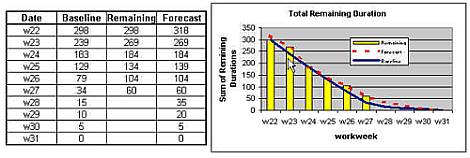
The chart has three data series which are interesting. The first is the baseline. This is your plan. We are always measuring against the plan. Note that the baseline remaining work goes to zero at a certain point in time. When there is no remaining work you are done. The intersection between baseline and the x axis is your finish date. This baseline gives you some important feedback. What shape is it? If is is fairly flat that indicates that you expect to make steady progress. If there is a steep drop somewhere can you explain how the people you have working on this are going to accomplish that? Is it the result of multiple tasks going on at the same time? If so, how are you going to get that all done in a week? Are there appropriate flat spots where holidays or vacations are going to interrupt work? This is a first check on your schedule model. If you take the next step and use work rather than simple remaining duration you will get even better visibility. If the curve of the baseline is acceptable and understandable then go on. If it looks wierd, then check your model.
The next important series is what I call the "Actual" remaining duration. It is the remaining duration at the date of the report. Each week you add another data point to this series. This is important because it tells you how you actually performed. By looking at the difference between remaining duration from last week and the current week you can see how much closer you have gotten to your goal. Sometimes you may have MORE remaining duration. This can happen if tasks are added or re-estimated. Now you will say that people will always say that a task is on track until the end, at which time they say that it will be done "next week". You have a point there. However, the tasks in your model should be a week to three long, so in the worst case it will just be a couple of weeks before you see remaining duration go flat. In the best case you see it the same week you are reporting. It can't hide for very long. At this point eyeball the chart. How far are you from baseline? If the two are diverging is the gap getting wider? If so, draw a line connecting the "Actual" remaining duration datapoints that you have. Extend it down and to the right until it hits the x axis. That is about when you will finish if you don't fix things. If it never hits the x axis going forward, you should probably call for help.
The third series on the chart is one which the macro derives for you. It shows your current forecast of remaining duration. If your "Actual" remaining duration is trending later then baseline then this series is probably your best case prediction. If you are under baseline, then you can reasonable expect to do a bit better than this (barring the case in which you have been ditching tasks each week) The important thing to do here is to make sure it is not unrealistic. Compare it to the baseline and eyeball it against your "Actual" line. If it is similar then you can feel confident. If it doesn't have a family resemblence to the baseline or your "Actual" line and if it drops like a rock just before the target finish date you are lying to yourself. It is too good to be true.
How does it match up with that line you extrapolated from the "Actual" data? Some variation is OK. The best estimate for when you finish is likely to be somewhere between where the two lines intersect the x axis, the point where no work remains to be done.
So you can see, this technique quickly and easily projects a finish. Project itself gives you a single projected finish date without going through the additional steps of exporting and charting the data, but the value here is that the series on the chart show you whether your plan is realistic. They show you your weekly progress in a very simple form. They give you a trend which can be used to make a projection. They give you a forecast which you can compare in a glance with both your original plan and your actual progress. For the amount of time spent, this is the most efficient schedule forecast method I can think of.
Now once you have graduated from soft foods and want to try something more exotic it is simple to extend this indicator. Assign resources to the tasks and track work rather than duration. This gives an incremental improvement in the accuracy. Primarily it has the effect of straightening out the lines. Want a deeper look into the workings of the project? Use an outline code or text field to categorize specific tasks in your schedule and extend the code to produce a series for each of the categories of tasks. Want a bit more detail in the historical data? Instead of just updating the remaining work, update the actual work too. This are incremental steps you can take when you and your team are ready. Steps you can take if you find that additional data to be useful. Sometimes a peanut butter sandwich is all you need though.
Posted by Jack at 11:01 PM | Comments (0) | TrackBack
Lost and Found - Struggling
That fish story reminded me that I tried putting one of these on in my living room. I nearly died trying to take it back off. I got stuck at this point:

To save people the trouble (and to remind myself to try this technique out next time) here is a great step-by-step guide for removing a zip-less wetsuit from Eliossub.
Posted by Jack at 12:15 PM | Comments (0) | TrackBack
Fish on Friday
I don't think I've seen a catfish this big before:

Personally I prefer salt-water fish to fresh-water, but I'm sure that this one made a memorable feast for the people in Northern Thailand who caught it.
Posted by Jack at 09:52 AM | Comments (0) | TrackBack
