« July 2005 | Main | September 2005 »
August 30, 2005
Incredible Sea Creatures
Today's subject: Squid
Found weeks ago at No Sword
Posted by Jack at 01:23 AM | Comments (0) | TrackBack
August 29, 2005
Writing Project VBA macros using the Macro Recorder
One of the easiest ways to learn how to use Microsoft Project VBA is to use the macro recorder. It does not always produce reusable output, but it does output the correct syntax and it identifies the objects, properties and methods which are involved in what you want to do. Let's work through a simple example like zooming the timescale to show only the selected tasks.
Start with turning on the macro recorder by going to the tools menu / select "macros" / select "record new macro". Give it a title and note where it is going to be saved.
Now select some tasks in your project. Then go to the "view" menu / select "zoom" / select "selected tasks" and click OK. Now we turn off the macro recorder either by going back to the tools menu and choosing "stop recorder".
Now you can look at the code. It should look something like this:
Sub Macro1()

' Macro Macro1

' Macro Recorded 8/29/05 by yourusername.

    SelectRow Row:=-6, Height:=2

    ZoomTimescale Selection:=True

End Sub
This code is OK, but it is not reusable because each time you run it, it will select two rows which are 6 rows above where ever your cursor is. Chances are you don't want that. So we edit it and remove that row.
Sub Macro1()

    ZoomTimescale Selection:=True

End Sub
This code works fine, IF you have a valid selection. Try running it on a blank row and you get an error. So we need to make one more modification to it.
Sub Macro1()

If Not ActiveSelection = 0 Then

    ZoomTimescale Selection:=True

End If

End Sub
Now if we have a task or tasks selected this code will zoom the view to show the entire duration of the longest task. An obvious next step is to assign this to a toolbar button so you can zoom the selection with a single click.
A more complicated example is exporting a file to excel. I can never remember the exact syntax off the top of my head, but turning on the macro recorder and exporting makes it easy. Here is the code I get while creating a map and saving a file. Note: for formatting reasons I've added several line continuation characters "_" so that the long lines will fit on the screen correctly.
Sub Macro2()

MapEdit Name:="Map 1", Create:=True, _

    OverwriteExisting:=True, _

    DataCategory:=0, _

    CategoryEnabled:=True, _

    TableName:="Task_Table1", _

    FieldName:="Name", ExternalFieldName:="Name", _

    ExportFilter:="Critical", _

    ImportMethod:=0, _

    HeaderRow:=True, _

    AssignmentData:=False, _

    TextDelimiter:=Chr$(9), _

    TextFileOrigin:=0, _

    UseHtmlTemplate:=False, _

    TemplateFile:="C:\...\Centered Mist Dark.html", _

    IncludeImage:=False

    MapEdit Name:="Map 1", _

    DataCategory:=0, FieldName:="Finish", _

    ExternalFieldName:="Finish_Date"

    MapEdit Name:="Map 1", DataCategory:=0, _

    FieldName:="% Complete", _

    ExternalFieldName:="Percent_Complete"

    MapEdit Name:="Map 1", DataCategory:=0, _

    FieldName:="Resource Names", ExternalFieldName:="Resource_Names"

    FileSaveAs Name:="C:\foo.xls", FormatID:="MSProject.XLS5", _

    map:="Map 1"

End Sub
You can see that the macro recorder makes this a lot easier than typing this in from scratch.
Posted by Jack at 12:34 PM | Comments (0) | TrackBack
August 27, 2005
Dinoganda
Hmmm...
"They're used to teach people that there's no God, and they're used to brainwash people," he said. "Evolutionists get very upset when we use dinosaurs. That's their star."
Seems that these
concrete dinosaurs

are now being used as missionaries.
"We like to think of [dinosaurs] as creation lizards, or missionary lizards," said Frank Sherwin, a museum researcher and author.
The claim being that dinosaurs co-existed with man and were vegetarian up until the time Eve bit the apple. Then things got ugly. I'm wondering what "theory" there is for their disappearance... Oh, here it is, the dinosaurs still exist!
Carl Baugh opened his Creation Evidence Museum in the 1980s near Dinosaur Valley State Park in Glen Rose, Texas, where some people said fossilized dinosaur tracks and human footprints crisscrossed contemporaneously. The Texas museum sponsors a continuing hunt for living pterodactyls in Papua New Guinea. Baugh said five colleagues have spotted the flying dinosaurs, "but all the sightings were made after dark, and we were not able to capture the creatures."
I'm as open-minded as the next person, but I'm having a bit of trouble believing in this chronology. Of course I've been brainwashed since childhood so that may have something to do with it.
Details at this LA Times Article: http://www.latimes.com/news/local/la-me-dinosaurs27aug27,0,6894033.story?
Posted by Jack at 08:52 AM | Comments (0) | TrackBack
August 26, 2005
The Charette Rediscovered
This time it is game designers. It is probably worth mentioning that the same technique of specifying a tight deadline is used in labor negotiations and by those seeking to draft constitutions. Those of us who occasionally fly the blue flag of procrastination (note: that is not my house) will find it utterly familar.
Posted by Jack at 06:14 PM | Comments (0) | TrackBack
August 25, 2005
Ruins and Rusty Metal
Look at this blog (also here) and tell me ruins and rusty metal are NOT some sort of architectural fetish.
Next up: big holes in the ground.
Posted by Jack at 05:13 PM | Comments (0) | TrackBack
August 22, 2005
Already Eaten
Haliotis rufescens (red Abalone) and Strongylocentrous franciscanus (red sea urchin) awaiting consumption by a group of ravenous humans.
Apparently the urchin does a lot of damage to kelp forests. I found these lurking on the edge of a kelp forest at Fort Ross this weekend. I estimate you get about an ounce or two of edible roe (AKA Uni)out of each.
Posted by Jack at 12:23 PM | Comments (0) | TrackBack
Galinsky
Just bumped into the Galinsky site which is:
"a free service for people enjoying buildings worldwide. Our searchable pages are designed to help you find and enjoy some of the world's most exciting modern architecture, both on-line and in real life.
Galinsky is for anyone with an interest in modern buildings and architecture, whatever your level of knowledge. We use no obscure architectural terms, and are obsessed with architecture that has turned into real buildings that people can see and appreciate - not designs for their own sake."Worth a look if you are traveling or want to find something interesting in your own location.
Posted by Jack at 12:04 PM | Comments (0) | TrackBack
August 18, 2005
Bob Colwell on Computer Architecture
Bob Colwell - the lead architect of the Intel P6 (aka Pentium Pro) goes around giving talks about computer architecture to anyone who will listen and I find him always entertaining. I just ran across a recent presentation from the The 32nd (100,000two-th) Annual International Symposium on Computer Architecture here. Worth reading for the visuals alone.
Posted by Jack at 05:25 PM | Comments (1) | TrackBack
August 16, 2005
Clueless
Seth gives a story about a 90 year old bank customer who gets carded at her local bank as an example of something that is "clueless". Uh, Seth, maybe she LIKES it and it makes her feel secure.
Posted by Jack at 12:46 PM | Comments (1) | TrackBack
MS Project Tip - Working with Float
In Microsoft Project everything is scheduled "As Soon as Possible" by default. This is generally a good thing, though it is a bit misleading at times. It is very common for people to look at the schedule and see that something did not start on the "start" date and get concerned. Fortunately there is an easy way to tell whether a task starting late is a problem or not.
The way to do this is to look at the Total Slack (also referred to as Total Float) for the task. This value shows you the amount of time that a task can move later in time without affecting the finish of the project. Project calculates this automatically for you by performing a forward pass calculation - adding up the durations of tasks going forward to determine how early they can finish, and then a backward pass calculation - the same thing but from the project finish date which was calculated in the forward pass. As a result of these calculations you get an early finish date and a late finish date for every task. The difference between the two is the total slack or float.
The problem with slack is that it is not always visible in the gantt chart. To make it visible is simple. First go to the "Format" menu and select "Barstyles. A dialog box comes up. Add two new barstyles as shown here:
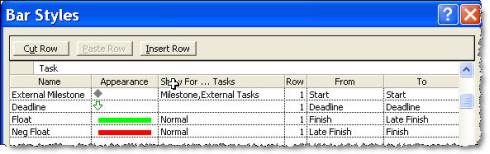
You note that I have two barstyles added and that they both use "finish" and "late finish" except in the opposite order. The reason for this is that Project draws all bars from left to right. The first bar will only be drawn if finish is earlier than late finish. The second bar will only be drawn if late finish is earlier than finish. This is a useful technique to remember for drawing other sorts of bars where you are comparing against another date (such as baseline, deadline etc.)
The result of adding these barstyles is shown in the next diagram. You can see for the first group of tasks that Task D has total slack of one week. So if you are in the second week of the project and contemplating whether Task B or Task D is more important to get started on, the answer should be clear that it is Task B.
The Neg Float bar comes into play when your tasks are already too late. In this case I set a "Must Finish On" constraint on the Finish milestone. In effect this makes Tasks A, B & C late by one day. You can see the red bar show up indicating that they are 1 day late. Task D is still showing 4 days of total slack.
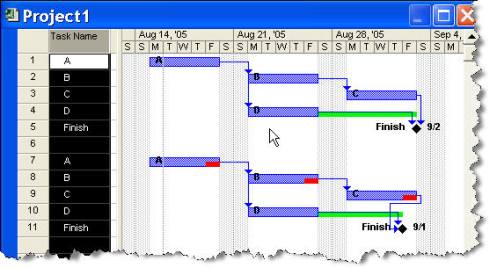
By making this information visible on the Gantt chart it is much easier to see what tasks are the ones which will affect your project completion and which tasks are less critical.
Posted by Jack at 07:50 AM | Comments (1) | TrackBack
August 12, 2005
More Myths
Mizuko Ito has a new book out about mobile phones and she offers a PDF of the introduction.
Two things strike me about the introduction. The first is what appears to be a false comparison about US attitudes to mobile communication. For example she states:
In the US, mobile phones are not universally heralded as an "advance", but have continuously been questioned as a problematic technology that erodes personal space"Sure people are annoyed by rude cell phone users, but the "problem" is not the telephones, but the users themselves. A quick google search shows that there are over 180 million US cell phone users. This is a huge rise from the 1991 base of 7.6 million. I'm willing to bet that people are using cell phones because they like them, not because they are forced to. They do consider them an advance or they would not adopt them at such a rate. It would seem to be the case that they are popular and not seen as problematic except by those who like to complain (hey, maybe people in the US are just more vocal about the problems...nah.) Likewise she dismisses US adoption of text messenging:
"The US, the supposed vanguard of the information society, has been stubbornly resistant to the allures of mobile messaging"This entirely ignores devices like the Blackberry which is also known as "Crackberry" due to its willing participation in the vice of information addiction. I do not know if the essays within the book are myopic as the introduction, but to me, these examples indicate someone finding precisely what they are looking for and excluding the obvious contradictions. It does not bode well.
The second thing I was struck by was how difficult it is to read. I consider myself to be a pretty good reader so I thought, no, it couldn't be me. So I looked a bit closer. I think I have found the problem. Almost every sentence uses "and" to compound things. One remarkable sentence has the word "And" embedded in it eight times. Beyond mere confusion, the overuse of conjunctions can overload the sentence with meaning because we are forced to accept all the permutations posited. Eight "ands" could imply up to 256 separate particles of meaning. It also has the effect of forcing upon the reader an acceptance they would not normally accept. The reader can agree with one conclusion (or statement) and disagree with the other, yet the sentence structure does not allow this. What could be a lucid examination and introduction to a collection of essays becomes a complex and impenentrably dense jungle of words. Why?
But don't let my words stop you. I'm just pointing out where I think it could be better. I'm sure that in the main it is a great book.
Posted by Jack at 08:29 AM | Comments (0) | TrackBack
From the Land of Onomatopoeia
Occasionally I get an urge to build up my language skills. This was brought home when I saw this guy's translation of "Botchan" and started to think that I'd like to better my reading skills. This led to an investigation of electronic dictionaries vs. printed ones and I ended up pulling the "New Crown Japanese-English Dictionary" off my shelf and opening it up. It opened to the "p" section and I was amazed at the amount of onomatopoeia. So many of the entries are things like paripari and panpan.
For your enjoyment here are some of them and their English equivalents:
Bye-bye for now.
Posted by Jack at 07:21 AM | Comments (0) | TrackBack
August 11, 2005
From the mind of Philippe Starck
Duravit has a new design center in Germany which includes a 19 meter tall toilet:
I've been wondering how long it would take him to do that ever since his famous "La Flamme" building for Asahi beer building was completed.

I must say that the walk-in size toilets in the La Flamme building are indeed impressive, though I believe they were manufactured by Toto.
Posted by Jack at 12:05 PM | Comments (0) | TrackBack
August 10, 2005
Intel Corporate Blogging Guidelines
Intel is famous for being paranoid so it is probably no surprise that there has been no external sign of corporate blogging. Certainly the fact that there is internal blogging has been reported in places like the San Jose Mercury News which talked about CEO Paul Otellini's internal blog.
But things are changing a bit and a bunch of people are working on how to break a small hole in the corporate wall. I've even argued that some portions of the wall should be kept. But I think it is nearly impossible to avoid getting on the bandwagon. With that in mind, here is what I've proposed as guidelines for Intel's corporate blogging guidelines:
- Be PASSIONATE!!! (uh, well only if you want to... It is OK to be boring... if you like)* Write about what you know, and what you're excited about.
- Respect your audience. Write clearly and well. With only your text to go by, many people will make assumptions about your intelligence so good writing (including correct grammar and spelling) does matter. Respect their opinions and don't insult them.
- Respect the truth. If you are posting code, take a minute to confirm it is not buggy. If you are posting product data, make sure it is up to date. If you are repeating information you have heard elsewhere, take a moment to fact check with another source.
- Respect privacy. If you are writing about co-workers or posting pictures which may show them, please make sure you have talked to them first. When in doubt, don't do it. Treat unreleased products as your closest friends and make sure you have permission before you write about them too.
- Respect the law. Understand and obey copyright law and fair use (link to EFF site -http://www.eff.org/bloggers/lg/faq-ip.php). Understand and obey Intel's trademark guidelines (link to trademark guidelines).
Respect your limits.
- Call for help if you need it. Trolls, stalkers, journalists and other strange creatures live on the internet. If you are feeling like you are getting in deeper than you can handle contact the blogging Ombudsman and they will help you.
It will be interesting to see where this leads. Certainly legal and corporate marketing people will chomp on whatever is proposed. I'll try and do a comparison between this proposal and the "real" guidelines if/when they are released. What do you think about this proposal?
*(note: the exhortation and triple exclamation points in the first item were lifted from someone else's version. The italics and permission to bore are all mine)
[Update: I was reminded that I'm required to add this: The content of this message is my personal opinion only and although I am an employee of Intel, the statements I make here in no way represent Intel’s position on the issue, nor am I authorized to speak on behalf of Intel on this matter. ...etcetera, etcetera, etcetera.]
[Update 2: don't forget to check out Josh Bancroft's ideas on this too]
Posted by Jack at 12:39 PM | Comments (5) | TrackBack
August 09, 2005
Googlebuse
Is the free ride for Google over? It seems to me that they have reached the point where the goodwill they earned in the past is wearing thin. Their strategy of everything being cute and free and beta was great for drawing attention (and continues to be effective with things like Google Earth), but it might not be as appropriate as they transition from being something fun and useful to being an essential part of the infrastructure. It seems that people have changed their expectations and the fun and colorful image is slowly turning to one of a faceless giant that doesn't respond. Some people are even changing their minds about the relative evil ranking of Microsoft.
Increasingly discussion of Google brings up issues of invasion of privacy, censorship and fears of dependence.
Their management is also being called into question about employment discrimination (regarding pregnancy and age)
How Google handles this new role and assumes (or fails to assume) the new responsibilities which go with it will be interesting. What happens if they continue to be less than transparent and less than responsible? Please note that I am not saying Google is being evil. I'm just saying that their motto "Don't be Evil" only excludes a small category of bad behaviors and leaves things like being greedy, uncaring and irresponsible wide open as possible choices. Does it leave room for another Hello Kitty company to assume the mantle of the beloved? Room for Microsoft to reprise the famous Apple 1984 commercial with an MSN butterfly fluttering it's wings in the Amazon and meanwhile a giant grey screen with 100 zeros shatters somewhere in Mountain View?
I'm not sure. But it is certainly worth looking at. Googlewatch always seemed a bit kooky to me, but they are seeming less so as time goes on.
Posted by Jack at 07:32 AM | Comments (0) | TrackBack
August 08, 2005
Improbable
But true. German igloos.
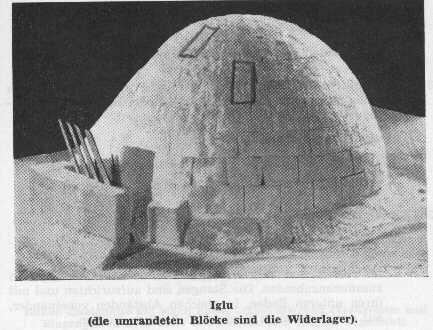
I'm not sure that the one which is built over a big blue plastic bag is authentic... unless it is the skin of a blue whale.
Posted by Jack at 08:28 PM | Comments (0) | TrackBack
August 06, 2005
Needles and Pins
I'm wondering how they move this thing into the gallery. Supposedly the whole cubic meter of pins is held together by friction and gravity.
 Information about Tara Donovan and more pictures of her works here.
Posted by Jack at 07:11 AM | Comments (0) | TrackBack
August 05, 2005
The second ugliest motorcycle I've ever seen

It is in Russian so I can't tell much about this monster, but that is OK. In this sort of situation words fail you anyway.
For a closer look without having to wait for the slow site to load take a look here.
Posted by Jack at 06:54 AM | Comments (1) | TrackBack
Blogs as Information Storage
Christina Pikas writes about whether blogs are useful just for writers and information workers. The answer seems obvious to me. I see many technology workers using them to post information about issues they have and solutions to their problems. I'd say there is a higher concentration of software people than any other, but that is because they are perhaps more familiar with the underlying technologies.
Link from the other Jack
Posted by Jack at 03:33 AM | Comments (0) | TrackBack
August 04, 2005
Map Shock
I use Powerpoint much more than I would like to and I find Cliff Atkinson's "Beyond Bullets" blog one of the best sources for information about what makes a good presentation. But a recent article on visual complexity ended up giving me an unintentional shock. The general point is that overly complex graphics or maps can cause people to go into a sort of mental shutdown (actually I wouldn't call it a shutdown. I'm guessing people are either busy trying to find the starting point or are dismissing the content entirely).
I read the blog entry which led me to the interview which led me to the recommended websites which purportedly have information about this subject and BOOM. My head exploded. No wonder these people have found this phenomenon. Their websites (here and here)are incredibly bad. I almost started to think it was an elaborate joke, but we are months away from April.
Anyway, the one thing I got out of reading this is that it is important to provide a starting point for entering into a subject. As much as I hate animation, it can allow you to have a very simple diagram which then becomes more complicated as you narrate your way through it. Just don't go overboard with gratuitous animation and objects flying around. I confine myself to fade in/out.
Oh, and the other thing. If you see a problem occuring frequently around you, there is a non-zero chance that YOU are the cause.
Posted by Jack at 10:25 AM | Comments (0) | TrackBack
If you are not sure what is inside your computer
you can look at this (slightly wierd) interactive diagram to see how things relate to each other in a Centrino notebook. The architecture is similar for a desktop pc. Centrino merely indicates that a specific set of processor, chipset (including ICH) and wireless network are present and certified to work together. Note that in real computers there are not red and blue pipes (veins and arteries?) connecting things together.
Posted by Jack at 09:49 AM | Comments (0) | TrackBack
The Eye of the Beholder
I posted about Kiyomizudera here before. I was doing some follow-up reading and came across a site which covers Asian architecture. I was a bit surprised that the entry on Kiyomizudera doesn't show much of what I consider to be one of the most prominent features of that temple. Then I looked at the page for Katsura Rikyu and also found it did not show what I consider to be the finer points of the place.
I suppose we all see what we want to see and this points out that one shouldn't be surprised that others don't see things in quite the same way.
Anyway, the site is a good place to learn a bit about Asian architecture. Almost makes me want to dig up my old copy of Sir Banister Fletcher's "History of Architecture" so I can post his quote on the "Non-Historical" styles for all to laugh at.
Posted by Jack at 05:27 AM | Comments (0) | TrackBack
August 03, 2005
Just needs a little dog to ride on the tank
There are a number of autonomous vehicles entered in DARPA's "Grand Challenge" race:
"The 2005 DARPA Grand Challenge will be held on October 8, 2005 in the desert Southwest. The team that develops an autonomous ground vehicle that finishes the designated route most quickly within 10 hours will receive $2 million. The route will be no more than 175 miles over desert terrain featuring natural and man-made obstacles. The exact route will not be revealed until two hours before the event begins."
But the one which interests me most is not some overgrown hummer, it is this little guy. By using a motorcycle rather than a 4 wheel platform it gives up inherent stability in exchange for a narrow profile. You can see more about the project here.
Posted by Jack at 12:17 PM | Comments (0) | TrackBack
August 02, 2005
Working with Task and Assignment Fields VBA
One common problem people face with project is that there are three classes of custom fields; task fields, assignment fields and resource fields. If you are in a resource view and you are looking at the Text1 field it won't have the same information as if you are looking at the Text1 field in a task view. This is true with reports as well. The solution is to copy over the items from the one field to the other. This is painful unless you automate it. So, to reduce the pain here is VBA code which does it for you:
Sub CopyTaskFieldToAssignment()

'This macro copies information in the task text5 field

'into the assignment text5 field so that is can

'be displayed in a usage view or in a report.

'Modify the line noted below to fit your needs

Dim t As Task

Dim ts As Tasks

Dim a As Assignment

Set ts = ActiveProject.Tasks

For Each t In ts

    If Not t Is Nothing Then

        For Each a In t.Assignments

            'change the following line to use

            'for a different custom field

            a.Text5 = t.Text5

        Next a

    End If

Next t

End Sub
Pretty easy. This one should have no problems because each assignment only has a single task that it references. However, going the other way could be a problem as each task can have several assignments. To sidestep the issue we can simply concatenate all of the text from all of the assignments. The code would then look like this:
Sub CopyAssignmentFieldToTask()

Dim t As Task

Dim ts As Tasks

Dim a As Assignment

Set ts = ActiveProject.Tasks

For Each t In ts

    If Not t Is Nothing Then

        t.Text5 = ""

        For Each a In t.Assignments

            'change the following line to use

            'for a different custom field

            t.Text5 = t.Text5 & ", " & a.Text5

        Next a

    End If

Next t

End Sub
The line t.Text5 = t.Text5 & ", " & a.Text5 appends whatever is in the assignment field to whatever is already existing in the task field.
Some simple modifications can make it work to copy from the resource fields.
Posted by Jack at 04:39 PM | Comments (2) | TrackBack
