« July 2006 | Main | September 2006 »
August 31, 2006
Project Server authors breaking radio silence
Or at least poking the periscope above the water. This week sees 3 new Project Server authors (presumably on a dare from Brian Kennemer). For some reason all of them have double letters in their names just like Brian...
Dr. Ed Hanna http://projectified.typepad.com/dr_ed/:
I'm expecting good things from Dr. Ed. His writing is very clear and is based on real issues people have. I think this is the most useful kind of writing even if I do not indulge in it myself :-)
His first post is about how things are features not bugs "Users are constantly finding “imagined bugs” in the software that—on closer inspection—are really not bugs at all. These problems are just a result of the way that they are misusing the application.". Ed, I agree with you. Many times people think microsoft project is doing something wrong when it is really that they just don't understand project. For example, write-only properties can't be read because they are write-only. You can't be silly and think that you can read what it is before you operate on it! Likewise, I have no idea why people think that the "effort-driven" box would be the equivalent of making a task fixed-work.
Ok... maybe I'm being too subtle here and on the internet no one can see you smirk. There are a lot of things Project does which are counter-intuitive or just plain wierd. The sad thing is that after using Project for years, they start to seem normal. When users don't "get" the application you can either blame the user or the application. Like the poor craftsman, I prefer to blame the tools - but always with a healthy dose of explanation about why Microsoft Project might not do things the way you expect it to. Making the application easier and more understandable should be a goal of the development team. Understanding the workings of Project should be a goal of the users. Hopefully they will meet in the middle.
Anyway, sorry about going off about this. That wasn't my intent. Dr. Hanna, Congratulations on your new blog. I hope to see more!
Kermit Llaurador - http://projectified.typepad.com/boricua/
Kermit's blog so far is just a placeholder. Looking forward to seeing a post or two here.
Reid McTaggart - http://projectified.typepad.com/reidsprojectworld/
Reid has recently guest posted for Evil Dr. Porkchop. The topic was a great example of how a couple of custom field formulas can be used rather than a macro featuring one of my favorite constructs, the nested Iif statement, and it is a long one at that:
Iif([% Complete] = 100,99,Switch([Enterprise Text1]=”Exclude from Phase Calculation”,100, [Enterprise Text1]=”Inception”,1, [Enterprise Text1]=”Planning”,2, [Enterprise Text1]=”Execution”,3, [Enterprise Text1]=”Closeout”,4))Like the others I'm looking for more great examples from Reid.
Thanks Brian for encouraging these guys. And best of luck to all of you.
Posted by Jack at 11:17 AM | Comments (0) | TrackBack
August 29, 2006
Waiting for Project 2007 - tick tock tick
Is it just me who thinks things are moving slowly? I know they have to tie the release into the release of Office 2007 which was pushed out just like Vista, but the public presence and excitement around Project 2007 seems almost non-existant after what was going on earlier in the year. No one I know seems to be doing anything active with the beta. Maybe it is just summer and things will pick up in the fall.
Looking at what I've been writing here I'm as guilty as anyone. The annual abalone dive should signal an end to this lethargy... or perhaps the start to an even slower fall season! But at least outside the project management world there is stuff going on. For example, click over to my other site and read an article I put up about how to clean an abalone.
Posted by Jack at 07:44 AM | Comments (0) | TrackBack
August 21, 2006
Wikipedia knows everything...
Check it out..
Pencil From Wikipedia, the free encyclopedia Jump to: navigation, searchThis article is about pencils, a type of pre-historic ooze that squelched out of cracks in the protozoa of the time. It was comprised mostly of richard Gere's DNA, spliced with that of Pamela anderson. It's Chemical name, bollocksius crapola, is derived from the combined talents of the two individuals from whom the DNA was taken.
Pencils are boring. They destroy morale and must be kept out of the reach of children. Never leave a pencil unattended. Pencils are high maintenance and explode when exposed to sunlight. Declare war on pencils. Pencils are the root of all evil.
Source: http://en.wikipedia.org/wiki/Pencil
I disagree with the exploding in sunlight part. Actually I have a soft spot for the dastardly implements - especially the 0.9mm variety.
Posted by Jack at 03:48 PM | Comments (0) | TrackBack
August 16, 2006
Massive Planetary Inflation - plutons held responsible
You know you are getting old when candy you bought for a nickel when you were a kid is 65 cents. In comparison moving from 9 planets to "maybe 12" with potential for millions (imagine the wheelbarrow you would need to carry that many planets!) is bound to happen over a few billion years, but is not something you expect in a single lifetime - but it has.
The International Astronomical Union is working out a defintion of "planet" in order to cope with some recently discovered objects which are larger than Pluto and are orbiting the sun. Apparently, until now there has been no scientific defintion of planet. But the discovery in 2005 of 2003 UB313 (nicknamed Xena) which orbits the Sun every 557 years or so has pretty much forced the issue.
Now at their annual conference, the IAU has issued some guidelines for the definition of planet:
- A planet is a celestial body that (a) has sufficient mass for its self-gravity to overcome rigid body forces so that it assumes a hydrostatic equilibrium (nearly round) shape, and (b) is in orbit around a star, and is neither a star nor a satellite of a planet.
- We distinguish between the eight classical planets discovered before 1900, which move in nearly circular orbits close to the ecliptic plane, and other planetary objects in orbit around the Sun. All of these other objects are smaller than Mercury. We recognize that Ceres is a planet by the above scientific definition. For historical reasons, one may choose to distinguish Ceres from the classical planets by referring to it as a “dwarf planet.”
- We recognize Pluto to be a planet by the above scientific definition, as are one or more recently discovered large Trans-Neptunian Objects. In contrast to the classical planets, these objects typically have highly inclined orbits with large eccentricities and orbital periods in excess of 200 years. We designate this category of planetary objects, of which Pluto is the prototype, as a new class that we call “plutons”.
- All non-planet objects orbiting the Sun shall be referred to collectively as “Small Solar System Bodies”.
For a more scholarly take on the rules and the potential loopholes in them I encourage you to visit Phil Plait's "Bad Astronomy".
Posted by Jack at 11:43 AM | Comments (0) | TrackBack
August 10, 2006
Microsoft Project Performance Limitations
Someone was wondering the other day whether the limit on tasks in project would be constrained by the possible number of Unique ID's. They were concerned that the unique ID might be stored as a 16 bit number and that they could conceivably reach it over time. I am reasonably certain that the unique ID is at least a 32 bit number but since it is not documented, I thought I'd do a little test. To test it I tried to construct a project with more than 2^16 tasks (2^16 = 65536 )
My approach was to code up something which would add as many tasks as I wanted. Because there is always a concern that this might take a while I had it write to a log file along the way. And to get an idea of how long it would take I added a time stamp mechanism. What I found was what I expected... long before you get to 2^32 tasks (4,294,967,296 to be precise) you run out of time. Project becomes so sluggish that it becomes unreasonable to work with.
The reason is that Project stores the project in memory and that as the file grows larger, it becomes much more processor intensive to do anything with the file. To illustrate what I mean, here is a chart showing the time required to add tasks.
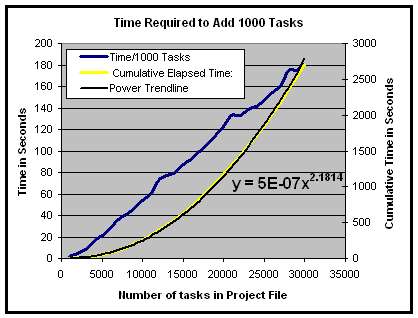
The straight line shows that as the file size grows, the time needed to add tasks increases almost linearly. The result of this is a power curve for the cumulative time required. Here you can see that it took about 45 minutes to add 30 thousand tasks. Extrapolating along this curve, adding 65536 tasks would take about 4.5 hours.
Going a bit further and adding the 1 million tasks which Microsoft claims is the limit for Project we find that it would take about 70 days. Along the way, we can look at the memory used by Project. I noted that as the number of tasks rose, the amount of memory that project utilized increased almost linearly as well. 30,000 tasks consumed 90 Megabytes of memory. If we extrapolate to 1,000,000 tasks that works out to 3 Gigabytes. And, in this case, the tasks consisted of just a name, no resources, no assignments, no dependencies, no notes, no formatting.
The point of all this is that Project is constrained more by the hardware you run it on than it is by any sort of fundamental limits to the data structure.
Tonight when I'm not working I'm going to try and see how long it takes to add 65K tasks. I expect it will take a few hours if my machine does not crash first. Of course I'm running this on my laptop with a 1.86GHz processor so a desktop machine will be faster. I do have 1GB of RAM thougn so if I run out of this and the computer starts paging to the disk then it will take considerably longer.
If you are curious about how well your computer performs, you can use the same code I used to check. It is probably best if you save any work and do not run this at a time when you expect to do anything else with your computer.
Sub PerformanceCheck()

'a simple tool to check the performance of Microsoft Project

'Copyright Jack Dahlgren, August 9, 2006

'for more information go to:

'http://zo-d.com/blog/archives/microsoft-project/microsoft-project-performance-limitations.html

'Note: entering a total test size of greater than a few tens of thousands

'will occupy your machine for a considerable amount of time!

Dim i As Integer

Dim j As Integer

Dim step As Integer

If MsgBox("Warning! May Crash Your Computer. _

Save ALL Work Prior To Running This Macro!", _

vbOKCancel, "Warning!") = vbCancel Then

Exit Sub

End If

'open a new file to insert tasks into

FileNew SummaryInfo:=True, Template:="", FileNewDialog:=False

OptionsCalculation Automatic:=False

'get values for upper limit

j = CInt(InputBox("Enter the Total number of tasks you want to test for.",  _

"Test Size"))

'get step size for log file

step = CInt(InputBox("Enter how many tasks for each interim performance check" _

& vbCrLf & "example - 1000", "Step size"))

'create a logfile and open for writing

'the logfile goes in the root directory

Dim MyFile As String


Dim fnum As Integer

Dim randID As Integer

randID = CInt(100 * Rnd())

'create filename with randID as a quasi-unique Identifier

MyFile = "c:\" & j & "tasks_performance" & randID & ".csv"

fnum = FreeFile()


Open MyFile For Output As fnum

Print #fnum, "performance test, " & j & " tasks"

Print #fnum, "Number of tasks:, Cumulative Elapsed Time:"


'get the start time of the test

Dim start, finish, current

start = Timer


'add tasks up to the total number

For i = 1 To j

    'if the current task is divisible by the step size

    'then write an entry to the log file

    If i Mod step = 0 Then

    current = Timer

        Print #fnum, i & ", " & current - start

        'reset the start to eliminate any time wasted writing to the file

        start = start + Timer - current

    End If

    'add the task

    ActiveProject.Tasks.Add (i)

    Next i

    Close #fnum


    On Error GoTo myerror


myerror:

        MsgBox i & " tasks in " & current - start & " seconds"

        Close #fnum


End Sub
This will give you a rough idea of how project performs on your computer. It is highly dependent on how much memory is available and how much processing power you have available. As a result, your findings may be different from what I have found by a large factor.
UPDATE: Of course things can always go faster. In this case I added a bit of code to turn off recalculation OptionsCalculation Automatic:=False and the required time to add 1,000,000 tasks drops to about 250 hours. 65536 tasks should take around an hour.
UPDATE #2: Adding 70,000 tasks took an hour and 13 minutes. The Unique ID field did not break. The empirical formula on my computer with Project 2000 for elapsed time is approximately 9E-7 * (number of tasks)^2. This translates to 250 hours to add a million tasks. Updating a million tasks on a weekly basis would be approaching the far edge of ridiculous. Such a thing is not the job for MS Project.
Posted by Jack at 11:23 AM | Comments (3) | TrackBack
August 08, 2006
AOL Breach of Privacy and what it really means
Over last weekend AOL released a datset containing about 20 million search requests and results. This amounts to a couple of gigabytes of information. In the thought that perhaps I could find what people were looking for in regards to project management I downloaded it last night and took a look.
I was not prepared for what I found.
The data is full of names and stories. Many of them are quite sad, and many have enough personal information to find out almost precisely who the person is. It is both fascinating and dreadful and should make anyone understand the importance of privacy laws.
A while back I wrote about google founder Sergey Brin stating "people come to us in weakness" and I though at the time it was arrogant. Now I know better. People are in bad situations. The only good that can come out of this is an understanding of the difficulties in living in this world.
click on the link and it will open in a new window
run escape; a search tale
It is clear from the results contained in the dataset that the "internet" is now serving as doctor, lawyer and priest to millions of people. Their communication should be as well protected as medical records, attorney/client documents and confessions. Don't let anyone convince you otherwise.
Posted by Jack at 08:52 PM | Comments (0) | TrackBack
August 03, 2006
PMI Practice Standard for Scheduling Required Components
In reviewing the PMI Practice Standard for Scheduling I came across their proposal for which components would be required for a schedule to be considered "minimally acceptable". The good news is that most of these fall out of any modern scheduling tool such as Microsoft Project or Primavera Project Planner.
The bad news is that at least if you use Microsoft Project you need to use "Physical Percent Complete" methods to update your schedule. The recommendation is that the concepts of earned value be used to fill in this field. Project in the past has had some difficulties with the use of Physical Percent Complete instead of just using Percent Complete or updating through Project Web Access. It has been a while since I've looked into those issues, but it looks like the time has come to do some testing.
In case you are interested, here are the required components. I've marked the ones which the schedule tool should calculate for you automatically:
- Activity ID - Calculated
- Activity Label - Manual
- Baseline Data Date - Manual
- Project Calendar - Manual
- Project Start Constraint - Manual
- Critical Path - Calculated
- Data Date - Manual
- Activity Actual Duration - Calculated
- Activity Baseline Duration - Calculated
- Activity Original Duration - Manual
- Activity Remaining Duration - Manual
- Project Actual Duration - Calculated
- Project Baseline Duration - Calculated
- Project Original Duration - Calculated
- Project Remaining Duration - Manual
- Activity Actual Finish Date - Manual
- Activity Baseline Finish Date - Calculated
- Activity Early Finish Date - Calculated
- Activity Late Finish Date - Calculated
- Project Actual Finish Date - Calculated
- Project Baseline Finish Date - Manual
- Project Early Finish Date - Calculated
- Project Late Finish Date - Calculated
- Free Float - Calculated
- Total Float - Calculated
- Milestone - Calculated
- Activity Physical Percent Complete - Manual
- Project Physical Percent Complete - Calculated
- Project Name - Manual
- Project Schedule ID - Manual
- Project Version - Calculated
- Finish to Start - Manual
- Activity Actual Start Date - Manual
- Activity Baseline Start Date - Calculated
- Activity Early Start Date - Calculated
- Activity Late Start Date - Calculated
- Project Actual Start Date - Calculated
- Project Baseline Start Date - Manual
- Project Early Start Date - Calculated
- Project Late Start Date - Calculated
- Unit of Measure - Manual
- WBS ID - Manual
Posted by Jack at 03:06 PM | Comments (1) | TrackBack
