« October 2006 | Main | December 2006 »
November 30, 2006
MS Project 2007 - Changing Working Time
For the past few versions of Microsoft Project (Project 2000, Project 2002, Project 2003) the changes to the desktop application have been fairly minor. But Project 2007 shows that some attention is again being paid to the desktop user. One of the more subtle changes that has been made is to add more functionality to the "Change Working Time" feature. This is the way that a user sets and modifies calendars. Go to the tools menu, select "change working time" and the new dialog looks like this:
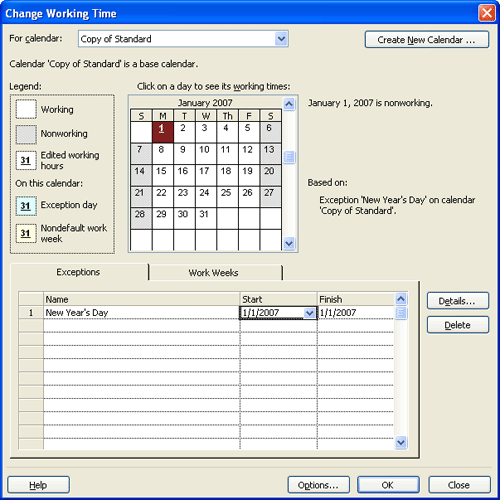
In this example I'm setting the first day of January to be non-working time. What is new about this is that you get to name the exceptions. See the list below? Type in a name for it and you can more easily keep track of it. I am guessing that the name of the exception is retrievable with some code so you could conceivably extract all the exceptions from a project using a bit of VBA and check them against some master list.
The other exciting thing about this is that you can set an exception to recur. Since Jan 1 comes once a year, I'm setting it to be an exception on a yearly basis in the following screenshot:
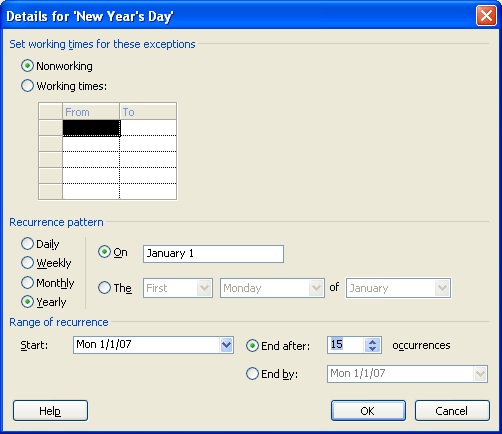
The options are pretty self-explanatory. You can set it to be the same calendar date or if you want it can be the first Monday of a month or the third Tuesday or whatever vacation vagaries your clever company decides to inflict upon you. These options are also available for monthly recurrences. Just knowing that you won't have to scroll through months and months just to set up standard holidays is a great help So is the ability to label the exceptions so you know that 5 days in December of next year are blocked out because the office is being painted rather than having to guess why no work is going on at that time.
I recommend you work through this as you start any new project. Official holidays and vacation time can easily eat up a month of time. If you haven't accounted for this in advance you will find yourself postponiing that vacation or eating Turkey and Pumpkin pie at work.
Posted by Jack at 01:15 PM | Comments (0) | TrackBack
November 28, 2006
Microsoft Project Tips: Hiding Resource Percentages
Once in a while the resource percentage showing on the task bar becomes too much. If you are wondering what I mean, take a look at this screen shot:
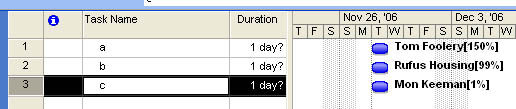
See how each resource has the percentage shown after it? That happens whenever the resource is not assigned at exactly 100% to the task. When you update your schedule with actual work it is very likely that the resource will not longer be at a perfect 100%. The simple answer is to change the barstyle so that the text shown is the Resource Initials rather than the resource name. To do this, go to the format menu and select barstyles. Select the bar you want to edit and click on the Text tab in the bottom half. Change resource names to resource initials. Now, there is one more thing to do. Go to the resource sheet. Make sure it shows the resource intials column. Select the resource name column, then choose "copy" or CTRL+C. then select the resource initials column and paste CTRL+V the information into that column.
Posted by Jack at 03:33 PM | Comments (0) | TrackBack
November 27, 2006
Taking the PMP Exam - Part 4 - Customer Satisfaction
No word yet from PMI on fixing my login/connection problems, but then there was a long weekend...
To entertain you all in the meantime I have a random search that brought someone here. It is perhaps my bad habit to let my imagination run loose on search results (check here for what I pulled out of a series of search results from an AOL user).
In this case someone, somewhere (in Virginia) was searching hard from their PDA to get background on the phrase: 'pmp project manager useless hated'.
I'll leave it to your imagination if this is a good or bad thing. Was it mutiny? Or a PMP trying to gain self-enlightenment?
Posted by Jack at 12:47 PM | Comments (0) | TrackBack
November 22, 2006
Taking the PMP Exam - Part 3 - If you know the extension of the party
Still no progress on online PMI membership so I sent an email and got this response:
Thank you for contacting the PMI Global Operations Center in Newtown Square, Pennsylvania, USA. A Customer Care Associate will review your request and contact you within five business days.
If you require a more immediate response you can contact your local service center by phone or by email:
PMI Global Operations Center (Newtown Square, PA. USA):
Tel: +610-356-4600 (8:00am - 8:00pm US Eastern time (EST), Monday-Friday)
For Customer Care, select option 8 at the prompt.
Fax: +610-356-4647
Five days? For faster service send an email? Isn't that what I just did? Well, not to confuse things I'll just wait to hear back from them. For an organization that is proud of the way they have made things available on line, this sort of behavior is a bit unexpected.
Posted by Jack at 11:46 AM | Comments (1) | TrackBack
November 21, 2006
Taking the PMP Exam - Part 2 - Joining PMI
Some basic math:
PMP Exam - PMI Member = $405
PMP Exam - Nonmember = $555
PMP Membership = $119 + $10 first time fee
$555 > $405 + $119 + $10
This teaches us that the first step in the process is to join PMI if you are not already a member. Who says it is not about captive revenue streams? Oh well, it is only money and the benefits last forever, don't they? Or at least until next year.
The one little problem is that their on-line membership application is broken and won't go past the second page. Guess that is it until I can find another computer to see if another browser won't choke on their app. Maybe tonight...
Posted by Jack at 03:40 PM | Comments (1) | TrackBack
Taking the PMP Exam - Part 1 - Getting Started
The starting point for this journey is the PMI's site. You can get there by going to http://pmi.org. From there it is a short hop to the PMP credential page. PMI is a bit paranoid about their materials, so I can't give you a direct link to the "Certification Handbook" (current version is a pdf file titled: PDC_PMPHandbook.pdf) that you can open or download. This e-book is divided into 5 sections; Eligibility, Examination Information, Policies and Procedures, Credential Terms of Use and finally a section with Credential Application Forms. The last section is optional as the forms are also available through PMI's online credentialing system
The credential process and requirements changed not too long ago, so if you have downloaded this in the past and have an old copy on your disk or in a folder, get rid of it and get yourself a new copy.
Going to take some time to read the e-book and figure out what the next step is, but will be back soon...
Posted by Jack at 02:40 PM | Comments (1) | TrackBack
Taking the PMP Exam Naked - Part 0
I've been a critic of the PMI's PMP exam for nearly as long as it existed. (You can read past writings here) but I see a world where people actually take it seriously, so in the spirit of "if you can't beat them up, join them", and to give myself additional credibility for future criticism, I am planning to take the PMP exam.
But since I know that many people struggle through this process and can use help, and I'm nothing if not helpful, I'll be documenting progress along the way. Look for future posts to cover the application process, studying, reference material and the test itself. The "naked" in the title refers both to exposing the process and also for my strategy of eschewing prep courses and PMP "Tips and Tricks" books and sticking to just what is in my head and in the PMBOK. I may pick out and highlight any other free resources I come across. If you have any that you are aware of, just leave a comment on this post and I'll compile them into a master list at the end.
So stay tuned. I hope to run though this process as quickly as possible and will be keeping track of time along this way.
"Bang"
- there goes the virtual starting gun. Gotta get running!
Posted by Jack at 02:19 PM | Comments (0) | TrackBack
November 17, 2006
MS Project 2007 Change Highlighting and the Interim Plan
Microsoft Project 2007 has a new feature called "Change Highlighting". It shows how a change to one task affects others which have dependencies on it. For example, the screenshot below shows how changing Task A from one day to two days affects the start and finish dates for all the other tasks:
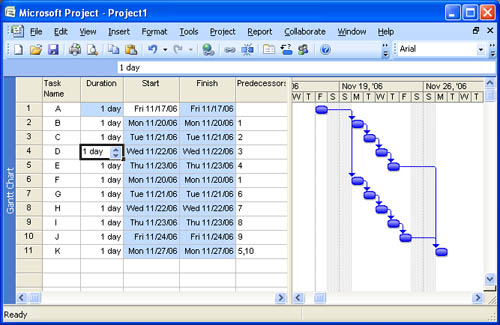
The blue highlighting shows the fields which have changed due to the first change. This is certainly very useful, but it is missing a few things.
- First, we don't know whether the change was a good change or a bad change.
- Second, as soon as we make another change, the highlighting will change to tasks affected by the second change.
- Third, we don't know the magnitude of the change. This is a very simple project and all the changes are one for one, but in some cases a major change to one task may change another by only a very small amount. Perhaps an insignificant amount. But we have no way of knowing from this feature.
Fortunately Project has had the ability to show the effects of changes in a robust and persistant way. That is through the use of an Interim Plan. An interim plan is really a very simple baseline. It stores the start and finish dates of tasks into the user defined start and finish fields (Start1-Start10 and Finish1-Finish10). If you add a couple barstyles to your view you can easily see all changes that were made in an editing session.
The first step is to save an interim plan. To do this go to the Tools menu, select Tracking, then Set Baseline. The following dialog box should appear:
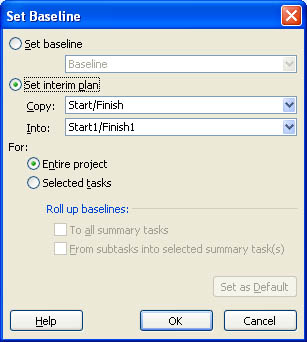
In this example we are using Start1 and Finish1 to store the dates. When you are done click OK. Next we need to set up the barstyles to show three things. Formatting the barstyles is done by going to the Format menu and selecting Format Barstyles
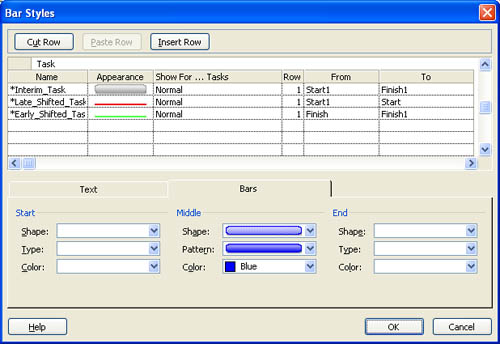
- First we show the interim plan. For this we are using a "silver" colored bar drawn from Start1 to Finish1. It represents the original task.
- Next we create a bar to show if tasks have slipped later than originally planned. We use a red bar for this and set it to draw from Start1 to Start. Project will only draw this bar if the second date is later than the first date.
- Then we create a bar to show if tasks have pulled in. We use a green bar for this and set it to draw from Finish1 to Finish.
When you are done, the barstyle dialog box should show the three bars as below. Note that order is important. The bars are drawn in list order, so if you put the silver bar last it will hide the red and green ones.
When this is set up, go and make some changes in your plan. Here I have made two changes. See if you can figure out what was changed. (hint: originally all durations were 1 day)
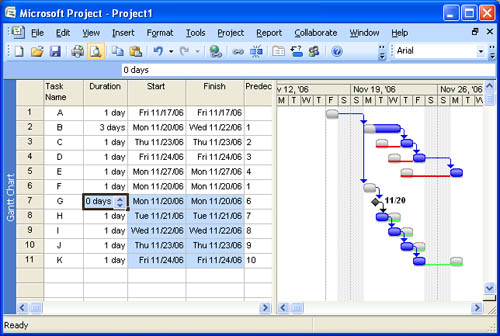
By saving this view and using it whenever you are editing your file you will have a much better indication of what you are doing to your file than you will get from the "Highlight Changes" feature in Project 2007. Not only that, but this technique can be used in Project 98, 2000, 2002 and 2003. I hope you will find it useful. Just remember to reset the interim plan at the start of your editing session.
Posted by Jack at 02:03 PM | Comments (0) | TrackBack
November 13, 2006
Microsoft Project 2007 VBA Help now Available Online
Microsoft Project 2007 (and the rest of Office 2007) were released over the weekend (Nov. 12, 2006) and while it will take until early next year to make it through the retail channels you can at least get started with perusing the help files. The last version of Office started a trend towards on-line help which I feel is somewhat inconvenient when you are not working on a network, but at least it allows them to keep the help up to date. And as a side benefit, it is available to all, even if you don't have the program. This used to be a sore spot for the VBA help as it only got installed through a custom install, something some corporate IT departments overlooked.
For example to access the help files for Microsoft Project 2007 VBA you can go to this URL:
http://office.microsoft.com/client/helphome.aspx?ns=WINPROJ.DEV&lcid=1033
The lcid=1033 at the end notes that the language is English. Change that to 1041 for Japanese. I'm not sure if any of the content is up for other languages, but you can poke around and see for yourself.
The regular help for Project 2007 itself can be found here:
http://office.microsoft.com/client/helphome.aspx?ns=WINPROJ&lcid=1033
From here it is a simple matter to look around at the rest of the online help for office. Check these entries for Excel and Word:
Excel Help: http://office.microsoft.com/client/helphome.aspx?ns=excel&lcid=1033
Excel VBA Help: http://office.microsoft.com/client/helphome.aspx?ns=excel.dev&lcid=1033
Word Help: http://office.microsoft.com/client/helphome.aspx?ns=winword&lcid=1033
Just extend the pattern and you can find help on any Office 2007 product. This is a great resource so take advantage of it and have fun!!
UPDATE: Looking a bit deeper, this approach also appears to allow the help writers an excuse on their deadlines since they can always "post it tomorrow" and in the case of some new objects like workweek, it looks like that is what they are going to do...:-(
Posted by Jack at 01:52 PM | Comments (1) | TrackBack
November 12, 2006
Review Me
Sure, $20 comes in handy. That is what reviewme.com is paying for this post. If you want to quit reading now, you have my permission. Otherwise, you can read about why I think this might not be such a good idea in the long run. Or maybe not. Just rest assured that not a word about Microsoft Project or Project management will follow. Except the news that Project 2007 hit "RTM" and is ready to download if you have an MSDN subscription...
ReviewMe.com is a company which hopes to match advertisers with "influencers", that is people who have something which is well read and presumably influential. The payout scales according to influence which they determine through some combination of technorati rank, alexa rank, estimated RSS readership (how they determine that I don't entirely know) and something else which I have forgotten already. Already I think something is broken here. Technorati ranks are kind of bogus in my opinion. They can be gamed and are pretty useless. Most traffic here is through search and the site shows up on the first page of google (and in some cases as the first site on google) for a handful of queries. To me that is more important than being linked to by some other blogger somehow. But then, what do I know? I do know that this will influence some people to work on those measures for their sites to maximize the payout. I'm not really one of them. I only care that people can find answers to whatever questions they have, and not what sort of ranking the site may have.
They also require that the post be 200 words minimum. Did I mention the 200 word minimum? Yeah, maybe I should just stop here and say that accepting $20 for 200 words makes me feel a bit cheap. But it would buy lunch for me or a couple of sixpacks and no harm done except for the damage inflicted on my reputation, and collateral damage to my readers, but then again, none of you ever donated even 20 cents to keep my site going in the past so be advised that the first who offers $21 can end this experiment here and now. For $22 you get a complementary link to your site. For $23 you can have two links and one of the beers I buy with the money. More than that and the sky is the limit.
Actually, I don't have much fear that it will be damaging. It will either work brilliantly and the world will be flooded with ReviewMe postings, and the occasional mercenary post will not seem out of place. Or it will fail and I can delete this and no one will be the wiser. I'm a bit worried about how it will encourage bad behavior by other people trying to game the system. It would be great if everyone had altruistic motives and was sharing information out of the kindness of their hearts, but those that are are already doing that, and paying for posts just brings in more people with different motivations. The web should be free in my opinion. This place is just a chance to give back for what I've received from it so far.
Anyway, if you are running a blog or are an influencer (whatever meaning that may have), you might want to check it out and see if it matches up with what you are trying to get out of your site.
https://www.reviewme.com/
Posted by Jack at 09:41 PM | Comments (0) | TrackBack
