July 31, 2008

Poison Oak - Leaves of Three

JD2_0164
What you see here is poison oak also known as "Toxicodendron diversilobum". It can be found in much of California. The reason it is called poison oak is that there is an oil within the plant called "Urushiol" which causes mild to extreme itching if you get it on your skin. There are a number of home and commercial remedies (the cheapest is probably washing with VERY hot water - this releases and depletes the histamines which cause itching) but the best thing is to just avoid contact altogether.

From the picture you can see several of the key characteristics. The three leaves are one of the most well known identifiers and there is even a rhyme "leaves of three, let it be" to help remember. Oak leaves have a similar shape but do not come in groups of three. Poison oak also grows on a woody vine and frequently climbs trees or stands as a low bush. The color is also a good indicator. It is green in spring and gradually turns reddish and then brown in the fall. When green the leaves are a bit shiny, but as they age they lose some of the shine.

Poison oak can also be recognized by the small white berries it produces. They are about the size of a pea. But you don't need to see the berries to know it is poison oak. The leaves tell the whole story.

If you have come in contact with poison oak, the best thing to do is wash as soon as possible. Because the urushiol is an oil, use soap or other detergents when washing. Water alone won't help much in removing it from your skin. The sooner you wash the better because once it starts to soak into your skin, it won't be easy to get it off.

It can contaminate clothing as well, so if you have been through an area with a lot of poison oak, make sure to wash them well.

All in all, the best strategy is to be able to identify it, and then avoid it.

November 25, 2007

New Tools - Crescent Sliding Wrench

sliding-crescent-wrench.jpg

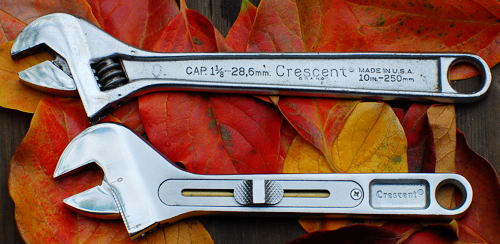
Here is another update to a tool which has been unchanged for years - the Crescent Wrench. The slider on the handle opens and closes the wrench. Sliding the handle rotates a bronze rod which turns the worm gear which controls the wrench opening. Having the adjust be so quick and positive is really an improvement.

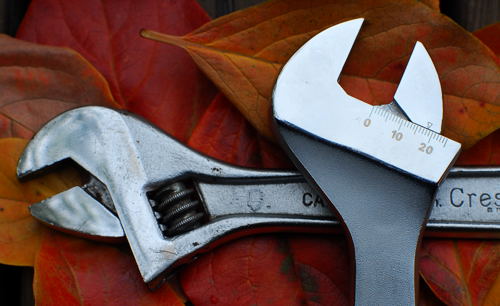
Another nice feature is the scale on the wrench face which tells how wide it is open. One side is marked in inches and the other in millimeters. This is useful when you are trying to figure out what size wrench to use after you have rounded the corners with the Crescent wrench.

The only negative about this wrench is the added bulk and weight. I think that the convenience and speed of adjustment more than make up for it though.

sliding-crescent-wrench-adjustment.jpg

New Tools - Craftsman Folding Utility Knife

Stanley-10-099-vs-craftsman-folding-utility-knife.jpg

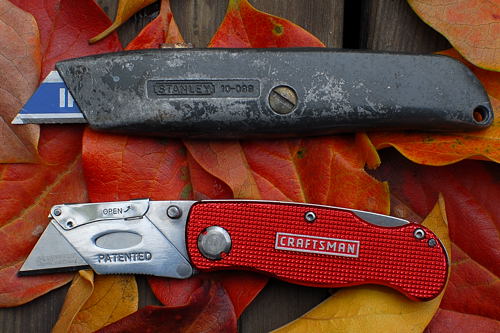
Some things never change, or at least that is what I thought. The old Stanley 10-099 utility knife has been around forever. But in the past few years there have been a bunch of new twists on it. One of them is the folding utility knife. This craftsman model flips open just like a regular lockblade knife. Flip the lever up and the side rotates down so you can change the blade without any tools.

But this flash comes at a price... There is no room for spare blades which is almost a fatal flaw. The aluminum handle is filled with dimples for drywall mud and other stuff to hide in. You can't just wipe it clean. And last, the whole blade is always exposed when it is open. The retractable blade on the Stanley allows you to extend only as much as you need so you can set the depth of cut allowing you to easily score materials.

The folding knife is smaller and flashier. If you work only with clean materials it would be a great choice, but for drywall and throwing in the tool belt, the venerable 10-099 is still champion.

September 26, 2007

reset mp3 player m240d

Poor Dvorak. Always suspecting conspiracy when keyword stuffing is enough.

September 4, 2007

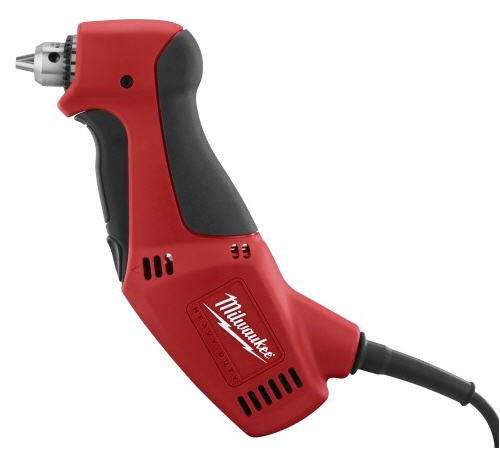
New Milwaukee Close Quarter Drill Review 0370-20

milwaukee-0370-20-close-quarter-drill.jpg

I've written before about Milwaukee's close quarter drills (also called "right-angle" drills) and was glad to see that the new version Model 0370-20 3/8" close quarter drill improves upon the old one. First, let's cover what is better about it.

  • The housing has been redesigned so that the teeth on the chuck are no longer in close proximity to your fingers and the work. As far as I can see, they shouldn't be able to contact the work if it is flat. I'm not sure if this limits how close you can get in a corner, but it is a welcome change.
  • The main switch and reverse switch have been redesigned and put in a logical place. On the old model the reverse switch was at the back of the tool so it took two hands to reverse.
  • The cord now comes out of the back instead of the bottom. I think this may not improve the balance of the tool, but the cord is now out of the way in tight spaces.
  • They put rubber grippy stuff on it. The earliest versions of this drill were shiny and smooth - which means they got slippery when you start sweating. This one is grippy and has an octagonal shape to the grip which should improve grip and also alignment.

The older version was reputed to be build by Sioux and re-badged by Milwaukee. It was pretty obvious that the design and even the materials were slightly different from the rest of the line. Now it is just like another member of the family. We won't know for a while about the longevity, but if it is like the other milwaukee drills then it should be a very worthwhile investment.

Oh, the one disadvantage is that it no longer looks like a duck. And I haven't seen a 1/2" version.

September 2, 2007

Sanyo Eneloop Rechargable Battery Review

Eneloop rechargable batteries

I'm so glad to see that Sanyo finally delivered what I really want, rechargable batteries that work when I want them to. Often I want them to work weeks or months after I last charged them, but most NiMH (Nickel Metal Hydride) rechargables self discharge pretty fast and there is no charge left when I need it. With the eneloops, you can charge them after you last used them and chances are there will still be charge left weeks or months later.

I've put them in flashlights and camera flashes, both items you don't use often, but you want them to work when you need them. And I've very happy with their performance and shelf life. They come pre-charged from the factory so you can even start using them right away. The self discharge rate is dependent on ambient temperature, so they will hold a charge longer when stored in cooler temperatures. I'm not sure they are what you want if you leave a flashlight in your car trunk all summer, but they are perfect for things like flashlights, remote controls, cameras, clocks and other things which require a low self-discharge rate.

With the price of non-rechargable batteries and the toxic materials they contain, it only makes sense to use a battery which is capable of being re-used a number of time. I highly recommend the eneloops.

I've seen them available both with and without a charger. You can use any 1-5 hour battery charger to charge them so if you already have a charger, you can probably use it. The eneloop charger is a slick white thing which matches the battery design and it is not that expensive. High speed chargers (1/2 hour) are likely to create a lot of heat in the cells - that is not usually a good thing.

They are available in AA and AAA sizes.

August 31, 2007

Abalone Iron and Floatline

float-line-and-abalone-iron.jpg

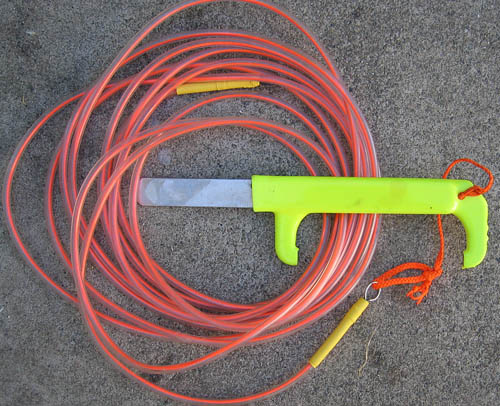
The California Abalone is a big gastropod and adheres to the rocks it lives on very tightly. This makes removal of them a tricky process. When the fringe of the abalone detects a visitor, the thick muscle pulls the creature tight against the rock. So to get them off the rock you need to slip one of these stout abalone irons under the shell very quickly, surprising the abalone and not allowing them to suck down tight. The edges are rounded so that it doesn't cut the abalone.

There are a wide variety of abalone irons, but it is probably a good idea to pick one with a built-in gauge. Divers are required to carry a measurement device with them whenever diving for abalone and having it built-in to the iron helps.

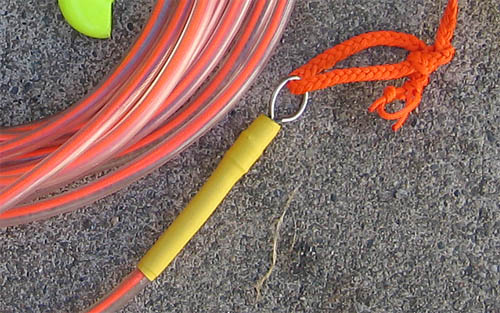
The other thing shown in this picture is a floatline. This one I made by feeding some fluorescent orange line through a length of polyethelene tubing. The ends are sealed with some plugs with a stainless steel ring at each end. I put some heat shrink tubing on there to neaten things up. The float line is then tied to the end of the abalone iron. It does not float enough to lift the iron, but it does float up and mark the spot where the iron is. So, when diving in rough murky conditions where the swell and current are moving you about, you may find an abalone lurking but not have enough breath left to spend time to remove it from the rock. Or you may want to come back to the spot for a second look. So all you need to do is drop the iron right there and surface for another breath. Then when you are ready, follow the line back down to where you were.

The float line also allows you to determine how deep you are diving or how deep the water is where you are. I'd consider it an essential accessory for any abalone or sea urchin diver.

float-line-end.jpg

June 24, 2007

Lego Mindstorms NXT Review

lego nxt robot

That pair of eyes on the front is an ultrasonic distance sensor for the Lego NXT robot. My 10 year old put this together to carry a video camera around the house and avoid bumping into stuff.

The NXT is at the top of the Lego hill and is a great place for people to start exploring both robotics and software development. The box in the middle is the controller which has ports to control and run motors and to get input from a variety of different sensors. The sensors included in the kit are touch, light, distance and sound sensors, but other companies also sell things like compasses, accelerometers, color sensors, IR seekers etc...

The NXT also comes with its own visual programming environment. It comes with a few tutorial projects which exhibit the basic functions. I think that most 8-10 year olds should be able to follow them, but getting beyond the tutorials takes some interest and experimentation. Making connections between the different programming blocks is done by simply dragging and dropping the output so it is fairly simple, but understanding loops and conditional branching is probably something that would not be suitable for an 8 year old. The box recommends for 10 and up and I agree with that recommendation.

The strong point of the NXT as a software learning platform is that it gives immediate physical output. You can write code and your robot actually moves or makes noises. This is not always true when you are just writing software. Their output is two dimensional. On top of this kids get to think about how to build a structure which is capable of doing something. The Lego pieces are easy to put together in different configurations that the focus in on shaping the construction to do what you want rather than trying to put it together.

Bill Gates has identified robotics as one of the key technologies in the coming decades. In my opinion home-built robots are still in the same phase as early computers were. A great way to get started in this is with the NXT. I highly recommend it.

Link to Lego Mindstorms home page

June 4, 2007

How to use a Vernier Scale

Vernier Scale

In the days before digital readouts, a vernier scale was a common thing for precision tools like micrometers, calipers and other precision measurement tools. The principle is simple. First create a regular scale such as the one shown above. On the top it ithe finest division is 16ths of an inch, on the bottom we have inches, 1/10ths of inches and that is divided even further in to 4 divisions leaving us with 1/40th of an inch (0.025 inches) for the smallest scale. Since we are reading the scale by eye, it is not useful to go much smaller unless we are looking with a magnifying glass - but there is an easier way to get a finer measurement. We use a secondary scale.

The secondary scale is divided such that it has the same number of increments as you would want between divisions, but instead of squeezing them in to a small space, they are spread out almost at the same spacing as the other divisions. I say almost because they are spread so that there is one more of them than there would be normally. Look carefully at the scale below:

vernier calipers

The eight divisions on the secondary scale take the same space as seven do on the primary scale. What this means is that only one of the marks is going to line up at a time. We can see here that the mark at 5 on the secondary scale is the one closest to aligning. Since the 0 is between 0 and the first 1/16th mark on the primary scale we know that the object being measured is 5/128ths of an inch. Actually it is a tiny bit more as the marks are not completely aligned.

We can confirm this on the 1000th's scale. There the zero mark is between the first and second marks on the primary scale. Looking further we see that the 15 mark is the closest to aligning. Add up the 0.025" from being past the first primary division and the 0.015" from the vernier scale and you have 0.40, slightly more than 5/128ths (0.039 inches).

June 1, 2007

Zooomr - Sooonr or Laaatr

If you haven't noticed, some of the photos on this site are hosted on the photo service Zooomr. And if you have been looking closely over the past week or two some of them may have flickered on and off. That is because Zooomr is going through a major upgrade. It really should have been done by now.

I think they missed their target date by at least a week due to both code and hardware issues. But they do have one redeeming quality - I have free use of my photos - which is important. Free is always a good thing especially when people take a liking to the photo and it gets downloaded a thousand times (what the attraction to a random orbital sander is I have no idea, but it is popular) - having on someone else's server makes this much better,

The new release has some interesting features. The most intriguing is that they are instituting some sort of mechanism by which people can sell their photographs (or probably more precisely, the rights to their photographs). How this will work I'm still not exactly sure because the new site was only up for 10 minutes - long enough for me to upload one picture and poke around a tiny bit. We just need to wait until their server is back up to figure out if this is brilliant or one of those things which "seemed like a good idea at the time".

If the site is up you can follow this link to my photos there:

http://zooomr.com/photos/jack

May 3, 2007

Squaring Walls and Foundations using diagonals and the 3 4 5 Right Triangle

I've written about framing squares but they are generally too small to ensure that something like an entire wall or foundation line is square. So there are a couple of other methods that can be used which only require a tape measure.

The first of these is very simple. For any rectangle, the diagonal lines from one corner to the opposite corner are equal. Assuming you have a rectangular or square shape, you can just measure both diagonals and if they are equal, then the corners will be square. If one is longer than the other, then the shape is more like a diamond than a rectangle and you need to push in one of the corners on the longest diagonal until both are equal. One thing to be very careful about here especially on framing is that the sides are the same length. If the sides don't match (top is not the same length as bottom or left side is not the same as right) then the diagonal rule does not apply.

The second way is to use simple geometry. You can do this without using a calculator if you use a 3-4-5 right triangle. If you have a right triangle with sides of 3 units and 4 units, the diagonal side will be 5 units long. So start at the corner you want to check, make a mark along one side which is 3 units out (use feet or even yards or meters as the units) on the other side make a mark 4 units out from the corner and then measure the diagonal distance between the two marks. If it is 5 units, then the corner is square. If it is less, then the angle is sharper than 90 degrees. If it is more than the corner is more than 90 degrees.

Once you have the corner square, it is a good idea to lock it into place using a diagonal brace. Triangles are much more rigid than squares. If you bump the corner of a triangle it won't shift into another shape, but if you bump a square it easily turns into a diamond shape.

January 26, 2007

Marking - Knife vs. Pen vs. Pencil vs. Brush vs. Crayon!

Choosing a Marking Tool

Marking the work is done in a large number of ways. For carpentry and woodworking the most common tools are the pencil, the knife, the crayon and the brush. But which is best?

The Construction Pencil

The pencil is probably one of the oldest marking devices. Rub some carbon from a burnt stick on the work and you are good to go. Things have progressed from there. The first thing was to enclose the graphite in wood so it won't smear on your hands and break. The second thing was to make it flat so it will make an even line when you draw near your square or straight-edge. The result is the traditional carpenters pencil:

carpenters-pencil.jpg

Pencils are great because they don't smear and are erasable. They have the disadvantage of changing shape as you use them, so sharpening is essential. Being flat they don't fit in a regular pencil sharpener, so they invented wierd sharpeners for flat pencils (hasn't anyone heard of a knife?) and eventually arrived at mechanical carpenter's pencils. These haven't been that popular because they have been expensive, but it seems like the new "Striker" pencil which is made of ABS plastic is ready to change this. It is pretty cheap and if placed in a bin near the cash register I think a lot of people will just pick one up. I don't have one yet so I can't comment on how well it works. (anyone want to send me one to test?)

mechanical-construction-pencil.jpg

The Marking Knife

The knife is probably tied with the pencil for age. A sharp chip of rock is as common as a stick. Knives are considerably more precise than pencils because the line made by a knife is much thinner and knives don't change shape as you use them. Because of this, a marking knife is much better for fine woodworking than a pencil. Marking knives have either one or two edges. Two edges allow you to use them on either side of your straight-edge. An example is this one from Chester Toolworks:

chester-toolworks-marking-knife.jpg

Knives lose to pencils out in the wild though. The sharp point is something you don't want to tuck behind your ear or stick in a pocket. On top of that, you can't mark down measurements with one and unless the light is good you can't see the mark they make. While the specialized marking knives are beautiful, I find that a chisel from the toolbelt or the ubiquitous utility knife is more practical - the retractable blade is very helpful and you can use it to sharpen your pencils! Surely you have one of these around:

utility-knife.jpg

The Brush

Brush? Yes, traditional Japanese woodworking relies on a brush and black ink to do marking and layout. The brush (called a sumi sashi) is a piece of bamboo with the end feathered with a series of fine cuts. It is stiff and straight and draws a nice thin line. More accurate than a pencil line, More visible than a knife cut.

sumi-sashi-japanese-marking-brush.jpg

The only drawback is the ink... Try sticking this in your pocket, or erasing it. This is a tool for those who do it right the first time. Like the carpenters pencil, modern technology has improved this tool a bit, there are now refillable sumi sashi which are more like a felt pen than a piece of bamboo. This makes it more attractive for many users.

The Lumber Crayon

The lumber crayon is just a thick hard crayon. Its advantage is that it marks easily on rough surfaces and makes big visible marks. It is commonly called a "keel", which appears to be an old Scottish word refering to:

“A variety of red ochreous iron-ore used for marking sheep, stone, timber, etc.; ruddle. Also, the red mark made with this on sheep, etc.” - source Oxford English Dictionary

Most lumber crayons nowadays are yellow or blue. The reason being that red (made from the above mentioned iron oxide) leaves a more permanent stain. Crayons are crude and the wide mark they make rules them out from furniture making, but they beat the pencil and knife for marking stone and making notes on rough lumber. Mine have all disappeared or I'd put up a picture of one. I can offer a picture of a sort of a hybrid. This is a graphite "crayon", a piece of graphite like from a pencil, in the shape of a crayon. It is able to make thick black pencil marks. I'm not sure if this is the best or the worst of both worlds.

keel-lumber-crayon.jpg

Conclusion

You really need a few of these, not all of them, but most. And add a black sharpie on top of that. If you are doing timber framing I'd spring for a felt-tipped sumi-sashi (available from The Japan Woodworker) and give it a try. For fine woodworking you might want to reward yourself with a nice marking knife to help get you in the mood. Steve Knight offers the Chester marking knife on his website: Knight Toolworks. The others should be available locally.

January 23, 2007

Upgrading a Macbook

Don't even stop to think about it. Just get 2GB of 200-pin SO-DIMM RAM (NewEgg is a good source for this) and a bigger HD and your lowly white bottom of the barrel MacBook will be running with the best of them. After doing this my machine which used to come to a crawl when I opened Excel and Firefox at the same time, now has Firefox, Word, Excel open and Windows Vista running under parallels desktop and it is still speedier than before.

It is pretty simple to do. Here are the steps:

Read the Instructions

First go to Apple's website and read about replacing memory: http://docs.info.apple.com/article.html?artnum=303721 This will tell you how to remove the MacBook battery and show you a diagram about the metal "L" shaped bracket that you need to remove. It doesn't say much more about that, so I will. To remove it you need a small philips head screwdriver. There are three screws in the long side which attach it. There are NO screws on the short side. The screws are captive, which means they don't come out of the metal piece. Loosen them, but don't try to pull them out. You will appreciate this fact when it comes time to put them back in.

Remove the SO-DIMM Memory

Now pull the metal piece out starting at the top of the "L". Be gentle, there is electro-static shielding on the back side of it. But don't worry, it would be hard to break. When this is removed you see two levers, one for each bank of memory. Flip the levers towards the left to eject the existing memory. Apple recommends that you should replace memory in pairs, but data I've seen doesn't show much performance loss if you don't. In other words, if you only have enough money now for 1GB of RAM, buy a 1GB SO-DIMM and pair it with one of the 256MB ones already in there. When you get some more spending money buy another 1GB and replace the 256MB. Buying two 512MB chips would be a waste of money. Back to removing them, Flipping the lever is all there is to it. Carefully note the orientation of the chips, particularly the little notch. It is easiest if you have your new memory ready, then eject the old, and immediately put the new stuff in. That way you won't forget and have to read the tiny diagram. Push the new memory in until it is firmly in there, 1GB chips seem to use a thicker substrate (maybe more layers on the PCB for routing or shielding?) so it takes some effort. If you are happy with your Hard drive you can stop there.

Upgrading the Hard Drive

Why do they fill up so fast? 60GB is just too small. I got a 160GB drive and sooner or later it will be too small. Anyway, HD's are pretty cheap. You are looking for a 2.5" SATA notebook drive. NewEgg has these as well. While you are at it, buy an external HD enclosure which has Firewire or USB2. Your MacBook can boot from either of these. Initially I thought, I'd just do it once, put the new blank drive in the Mac and the old drive in the enclosure, but then I thought that sometimes drives are DOA so I took a slightly longer route. Put the new HD in the enclosure, Hook it to your mac. Go to Applications/Utilities/Disk Utility.app and run it. Erase the drive and partition it if you want. Give it a name., and most important set it to be bootable. Then Get a copy of "Carbon Copy Cloner" and clone the old disk onto the new one. This will take some time. An hour or more. Just let it run. It might be a good idea to clean old files and empty the trash BEFORE you do this (maybe next time...). When the cloning is done the fun starts.

Removing the Hard Drive

The HD lives behind the short leg of the "L", so do this at the same time you are doing the memory. You will note a small white plastic tag. Pull on it. The old HD will slide out. Be prepared with a TR9 torx screwdriver. This is a pretty small size. If you don't think you have one, buy one before you start. As with the memory, note the position of the connector. When you pull things out, keep them in the same orientation (left side to the left, top side to the top) so you don't get confused. Remove the 4 black screws on the side that hold the stainless steel caddy to the old disk. Replace it with the new one. Slide it back in. That is it!

Put the MacBook back together

From here, put the "L"metal back, starting at the end of the short leg. You have to press a bit on the long leg to hold the memory levers in, but it shouldn't be too difficult. I got the screws started, then went back over them for a final tightening. After this pop the battery back in and you are done! You can now take your old HD and put it in your new enclosure for a back-up external drive. Nothing wasted at all (well except the ridiculous 256MB memory which you can sell on Ebay or keep in a drawer just in case your new memory has issues.

I'm pretty familiar with computers, but this really was easier than I thought it would be. Well worth the effort.

January 12, 2007

Milwaukee Magnum 1/2" Drill Model 0234-6 Review

Milwaukee_0234-6_Drill_motor.jpg

Mikwaukee Holeshooter... How do I love thee? Let me count the ways:

  1. Built like a rock (compare to the newer model 0300-20 which is clearly "value-engineered" and it shows)
  2. Never ever needs charging
  3. Regular old-fashioned keyed Jacobs chuck. A keyless chuck is not appropriate for the amount of torque this puts out.
  4. Trigger as smooth as any I've ever used
  5. Lasts almost forever. I've seen these in heavy use for more than a decade.
  6. Quik-loc feature is handy if you are the type that damages cords, otherwise it is a small pain, but at least you are sure that it is unplugged
  7. Great balance, if not a little heavy. You can use it one handed without the side handle.
  8. Powerful enough to handle most drilling jobs and even mixing drywall mud and the like
  9. Smooth from the lowest speed to the highest
  10. Brush replacement can't get much simpler than this

This is really one of those tools you want to buy once. Spend a bit more for it because it is built to outlast the others, even newer tools from Milwaukee. Ignore the 5.5 amps vs. 8 amps difference and pick this one over the Model 0300. It is a pound lighter and has a more robust side handle. The model 300 is awkwardly positioned between the 0234 and the larger and more powerful Hole Hawg series. 8 amps is really too much to hold with one hand for long. As for comparison with others like Dewalt DW235G (too light and cheap feeling - pick one up and see), Hitachi D13VF (too heavy and powerful for a handheld- will break your wrist) or even the Bosch 1013VSR (cheezy side handle and not so comfortable to hold), there isn't really much comparison.

This (and a 3/8" close quarter drill like this) will pretty much cover everything you need up to the point you are driving big self-feeding bits and bracing the drill against your thigh. They really got it right and there is a good reason that the tool has remained in production for more than 15 years. I think I bought the one shown in the picture (it is a model 0234-1) in 1990 or so and the new ones are almost exactly the same. At the time I wrote this, Amazon was selling it for $99. How can you beat that?!

January 9, 2007

Kitchen Remodeling - Three Steps to Ensure a Good Plan

Think First

The most common mistake in remodeling is to jump right into a plan. Everyone has some idea of what they want and the temptation is to jump right in and FIX it. This approach may solve one problem (or not) and may create others. As an architect, I have to say that kitchen design is one of the more difficult tasks, especially when remodeling an existing kitchen. People have such a complicated relationship with their kitchen that it is worth taking some time to evaluate your existing kitchen before you even start planning. With that in mind, here are three basic steps to getting started on a workable plan.

What Are You Doing?

A successful plan requires taking some time to really understand what you want and need about a kitchen. This goes beyond evaluating the differences between granite, corian, or formica counters. It goes beyond choosing cabinet styles or faucets, and it is something you can start to do right now if you are considering a kitchen renovation. The first step is to pay attention to what you are doing in the kitchen. After a while people become so accustomed to where things are and how to reach their coffee cup in the morning that they do not look closely at whether that is as easy or as satisfying as it could be. Pay attention for a day or a week and see what really causes you pain or makes you do things in a way you would rather not. Write them down if that helps you to remember.

What Are you NOT Doing?

The next thing is to figure out what your kitchen is NOT allowing you to do. For some people this will be obvious. Some will feel their kitchen keeps them in a box or doesn't have enough counter space or cabinets. Some will feel that their kitchen is not allowing them to entertain in a way they would like. This category will probably result in the biggest changes to the kitchen layout, but if there is nothing you find here then your remodel should be pretty simple. Consider ranking these items as satisfying some of them may rule out others.

Where Is Your Kitchen?

The final thing, and what can make a kitchen remodel successful while others are not is to consider what surrounds the kitchen. How does the kitchen relate to the surrounding rooms? Is the relationship with the dining room the way you would like? How does it relate to where you eat informal meals? Does it connect to the outside? Understanding how your kitchen fits into your house is the first step in changing that relationship for the better. Clients are often torn between the low cost of keeping things sort of the way they are, and the higher cost of actually moving things around so that they work well. My experience, learned the hard way of course, is that sticking with an existing layout that you are not really happy with is going to be a mistake. You will end up with the same old kitchen with perhaps some new finishes and appliances and your frustration with the way the kitchen works for you will remain. Working with a very basic floorplan drawing and sketching the relationships and activities each are used for is a common way to begin thinking about this, and thinking is what needs to be done first before you jump into any purchases or plans.

All of this can be done before you speak to a designer or an architect (or do it yourself) and will steer the design in a more productive direction.